Hi everyone
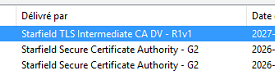
I wanted to state a strange problem I had, the web site was OK with all browser except Chrome.. I invistiguated a bit and I find that the cause is the certificate chain is broke, as Godaddy changed their root structure in October 2026.
As see there;
If it happen to you, you can check the error with the openssl client;
openssl.exe s_client -connect domain:443
The result will probably show something like that;
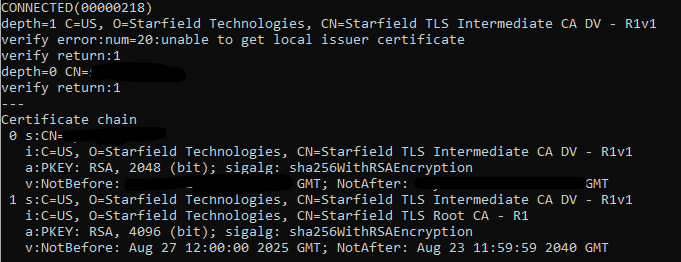
The error is because the root certificate is not ok for Chrome, so as a workaround we can instal other intermidiate certificate to make the chain work.
So, we will go from;
[Leaf Certificate] > [GoDaddy TLS Intermediate CA DV - R1v1] > [GoDaddy TLS Root CA - R1]
[Leaf Certificate] > [Starfield TLS Intermediate CA DV - R1v1] > [Starfield TLS Root CA - R1]
To something more like;
[Leaf Certificate] > [GoDaddy TLS Intermediate CA DV - R1v1] > [GoDaddy TLS Root CA - R1 to G2 Cross Certificate] > [GoDaddy Root CA - G2]
[Leaf Certificate] > [Starfield TLS Intermediate CA DV - R1v1] > [Starfield TLS Root CA - R1 to G2 Cross Certificate] > [Starfield Root CA - G2]
First thing is to download those certificate to install them in certmgr mmc. In local machine mode, and imported into Intermidiate Certificate Autority.
Go there; https://certs.godaddy.com/repository
In my case it was;
- Starfield TLS Intermediate CA DV - R1v1 (https://certs.godaddy.com/repository/sf_tls_issuing_dv-r1v1.crt)
- Starfield PKCS7 Certificate Intermediates Bundle (for Windows IIS) - DV - R1 with Cross to G2, includes Root (https://certs.godaddy.com/repository/sf_dv-r1-g2_iis_intermediates.p7b)
After it's installed, remove the Starfield TLS Root CA - R1 that is signed by itself.
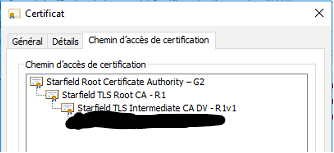
In the final it should be like that;


In IIS the strange part is iisreset dont reset the binding/cache, so I had in case to select another certificate to re-click the certificate to have IIS serve the correct chain'ed certificate.
In the final a certificate "show" display it like that;
Some article that talk the issue;
- https://techsearch.watchguard.com/KB?type=Article&SFDCID=kA1Vr000000JCNFKA4&lang=en_US
- https://community.fortinet.com/fortigate-3/technical-tip-resolving-certificate-warnings-for-dv-tls-certificates-issued-by-godaddy-starfield-s-r1-root-hierarchy-228937?tid=228937&fid=3