Windows Server 2016 RS3 stop FRS support
June 20, 2017, 11:49 pmHi everyone
A small update, now we must be sure FRS SYSVOL share are migrated to DFRS to allow a 2016 DC RS3 to be able to dcpromo.
) )
https://support.microsoft.com/en-us/help/4025991/windows-server-2016-rs3-no-longer-supports-frs
Windows Server 2016 RS3 can no longer be added as an Active Directory domain controller (DC) to an existing domain that is still using File Replication Service (FRS) for replication of the SYSVOL share.
Hard Exchange Migration (2007 to 2016)
June 16, 2017, 4:07 pmHi everyone
Today I will discuss a nonstandard way to migrate a Exchange 2007 to a Exchange 2016.
As we know it, we must say goodbye to Exchange 2007 because it mo longer receive support

The bestpractice is to install a 2010 to do a two step migration, but in some case if you can't, you could do a one step migration (for small customer)
That imply this;
You have to save all users email in PST.
- On the server by exporting all data via the Exchange CLI.
- or, PC by PC by exporting each account.
I suggest to go PC by PC if you want to backup the Outlook autocomplete cache
There will be a downtime in the email flow.
The step;
- Do a good backup
- Redirect the SMTP port to the new server, even if it does bot exist yet. The goal is to stop new email receiving.
- Backup all users email, don't forget shared room/ressource mailbox.
- Uninstall Exchange 2007
- Install Exchange 2016
- Re-add all user to the new server from Exchange ECP
- Enable circular logging. (for the restoration step)
- Restore all user email by importing their PST.
The good side;
- Uninstalling the Exchange does not remove the user email alias, thus its easy to readd all user back if you happen to not have a name policy for the alias.
- Mailing list and contact stay in your Active Dirwctory after the uninstall.
The bad side;
- To unistall I had to flush the public database link from adsiedit, as you can't uninstall even if the public database is empty.
- For all my contact and mailing list I had to take back the ownership of those object in the Active Directory to see them back in Exchange.
Thanks, that resume how to do :)
Picture took from; https://www.codetwo.com/admins-blog/time-to-say-goodbye-to-exchange-2007/
New baby !
June 16, 2017, 10:12 amHi everyone
I wanted to share a good new. Iam now a father of twin :) !
All went good, now you can wish me good luck for my night! hehe

Force a user logout when a machine has been locked for a specified period of time
April 5, 2017, 1:10 amHi, today I will talk a small tip to force a user logout when a machine has been locked for a specified period of time.
The specific question I seen that I want to answer was;
There are machines in a shared lab. Sometimes someone will lock the machine with the intention of coming back, but for whatever reason they do not. Currently the machine is powered off so another user can use it.
What would be nice would be to set a timer, say 20 minutes, then have a button display that could allow the next user to claim the machine. It should logout the current user and present the login screen to the next user.
Is there a Group Policy setting or perhaps some other means (Windows Credential Provider) to force a user logoff when a machine has been locked for a specified period of time?
That small tip is handy for internet cafe or in any case where there is shared computer.
First of all, in a case of shared computer, a local administrator can force a logoff or a normal user can switch the user in that windows with the option switch user
For it's a workaround, but it would be to create a local planned task with a on idle trigger with a 30 minute condition and the task will run shutdown /l
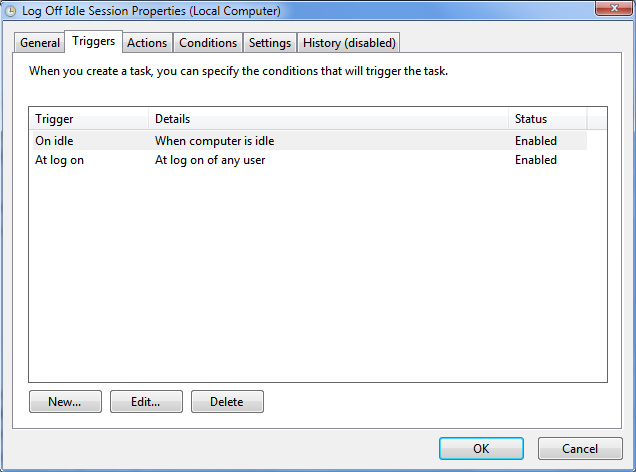
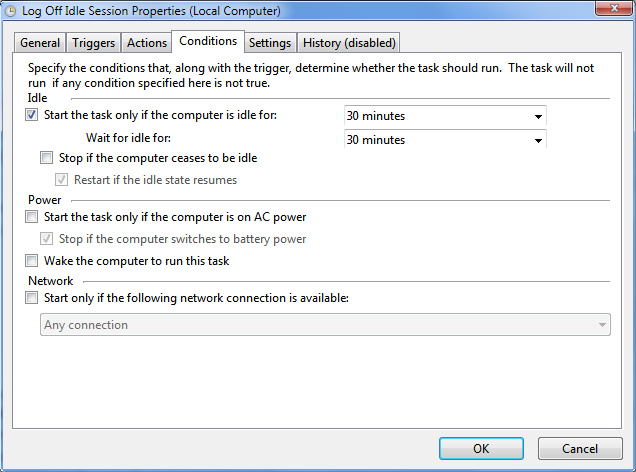
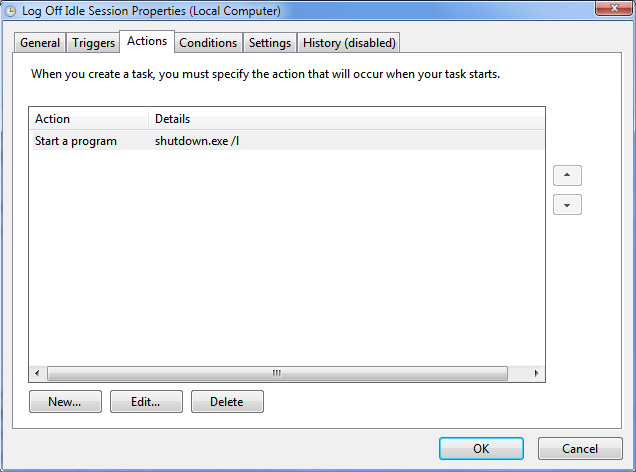
If someone wonder if the tip will happen if someone watch a movie, and the computer is not locked, then we can validate on technet, and no, as;
Task Scheduler checks for an idle state using two criteria: user absence, and a lack of resource consumption. The user is considered absent if there is no keyboard or mouse input during this period of time. The computer is considered idle if all the processors and all the disks were idle for more than 90% of the last detection interval.
Windows Server - Prevent users from changing printer preferences for color
October 25, 2016, 3:05 amThis post is created because I see a lot of demand on the forum to be able to block the color usage of some printers by blocking the user to change the printer preference.
At first I will tell that the driver make a huge difference, any option available in the preference's windows are available to the user, as they are mapped under the HCU of the user.
Sadly, but necessary to tell it, the easiest way to block that is to buy a printer that got the accounting module in it to be able to ask for a PIN for the color's usage. The driver is usually wrote to allow the user to enter the PIN when it detect that it's a color printout. Some model will ask the PIN locally on the touch screen.
Now some workaround:
First, we block the color usage in the printer's configuration.
Now if we use GPP in example to deploy the printer, please set it to replace. It will replace existing setting at each GPO refresh's interval. (by default 90 minutes)
Delete and recreate the shared printer connection. The net result of the Replace action overwrites all existing settings associated with the shared printer connection. If the shared printer connection does not exist, then the Replace action creates a new shared printer connection.
We could add the Printer only at each logon too in replace's mode.
I suggest that GPO below. That will prevent any user to manually add a printer into their computer to bypass our restriction. That will force the user to use published printer. As when the printer got connected the computer, the print driver got pushed, thus it open a door to allow a non-admin user to add the printer.
User Configuration--> Administrative Templates --> Control Panel --> Printers --> Prevent addition of printers --> Enable
Last workaround, block the color usage in the printer itself if you can.
As you can see there is not much tip to prevent the user, but as said it exist some workaround.
Thanks