Windows Server 2019 Domain Controller - Ready for production ! (KB4516077)
October 4, 2019, 9:15 pmHi everyone
Today I wanted to share a new, the KB4516077 is out and a *lot* of fix for the 2019 is in, for the ADDC's roles.
- Addresses an issue that causes File Explorer to report the number or the size of files and folders incorrectly when they use long paths.
- Addresses an issue that causes unnecessary restart requests on servers.
- Addresses an issue with diagnostic data processing during the Windows Out of Box Experience (OOBE) sequence.
- Addresses an issue that prevents a web browser from connecting securely to Windows Server. This occurs when using a client authentication certificate, such as a SHA512-based certificate, and the web browser does not support a signature algorithm that matches the certificate.
- Addresses an issue that may cause the Local Security Authority Subsystem Service (LSASS) to stop working with an “0xc0000005” error.
- Addresses an issue that prevents the BitLocker recovery key from being successfully backed up to Azure Active Directory.
- Addresses an issue that leads to excessive memory utilization in Microsoft Defender Advanced Threat Protection (ATP).
- Addresses a possible compatibility issue when Microsoft Defender Advanced Threat Protection (ATP) accesses case-sensitive Server Message Block (SMB) shares.
- Improves the detection accuracy of Microsoft Defender ATP Threat & Vulnerability Management.
- Addresses an issue that gives a Windows Hello for Business user two certificates for authentication during certificate renewal instead of one certificate.
- Addresses an issue that causes the lsass.exe service to stop working, which causes the system to shut down. This occurs when migrating Data Protection API (DPAPI) credentials using dpapimig.exe with the -domain option.
- Addresses an issue that may cause Direct Access servers to use a large amount of non-paged pool memory (pooltag: NDnd).
- Addresses an issue that prevents you from running the Active Directory Diagnostics Data Collector Set from the Performance Monitor for Domain Controllers. This causes the Data Collector Set name to appear empty. Running the Active Directory Diagnostics Data Collector Set returns the error, “The system cannot find the file specified.” Event ID 1023 is logged with the source as Perflib and the following messages:
- “Windows cannot load the extensible counter DLL “C:\Windows\system32\ntdsperf.dll.”
- “The specified module could not be found.”
- Addresses an issue in which the product description of Windows Server 2019 was incorrect when queried using slmgr /dlv.
- Addresses an issue that may cause authentication to fail for certificate-based authentication when the certificate authentication includes a cname as part of the pre-authentication request.
- Addresses a Lightweight Directory Access Protocol (LDAP) runtime issue for Domain Controller Locator-style LDAP requests. The error is, “Error retrieving RootDSE attributes, data 8, v4563.”
- Addresses an issue that causes LDAP queries that contain LDAP_MATCHING_RULE_IN_CHAIN (memberof:1.2.840.113556.1.4.1941) to intermittently fail on Windows Server 2019 domain controllers. However, these queries do not fail on domain controllers running previous versions of Windows Server.
- Addresses an issue that causes group membership changes in Active Directory groups to fail. This occurs if the Lightweight Directory Access Protocol (LDAP) client uses the Security Identifier (SID) Distinguished Name (DN) syntax after installing previous versions of NTDSAI.DLL. In this scenario, an issue with the LdapPermissiveModify (LDAP_SERVER_PERMISSIVE_MODIFY_OID) control causes Active Directory to incorrectly return a “SUCCESS” status even though the group membership change did not occur.
- Addresses an issue in which the Set-AdfsSslCertificate script is successful. However, it throws an exception during resource cleanup because the target server-side endpoint is no longer there.
- Addresses an issue that may cause a Hyper-V virtual machine and a Hyper-V host to lose network connectivity because of an inconsistency in the media access control (MAC) address learning process. As a result, the Hyper-V virtual switch drops packets.
As you can see the number of improvement is huge.
I would quote a Microsoft's employee;

Thanks everyone
0365 - Exchange Online X-Sender Spam Problem
October 3, 2019, 9:17 pmHi everyone !
Today I wanted to share a strange problem I found in 0365. It seem really easy to bypass the antispam filter with the x-Sender property if you know how.
An example of a spam that went-tru.
This email was not tagged as spam, and the sender and the receiver thought they were in the same compagny. Both contoso.com email alias are hosted in 0365. You can see the x-sender there that it was not the case..
X-Originating-IP: 192.3.186.164
User-Agent: Workspace Webmail 6.9.59
Message-ID: \......@email23.godaddy.com\
From: Jacky \jacky@contoso.com\
X-Sender: cchj712@adm1ncare.com
Reply-To: Jacky \joshua.braga@aol.com\
To: \Mich@contoso.com\
To note the SPF record was setup correctly and was strict, but strangely 0365 check the SPF record of the x-sender, not the sender property ..
The SPF check was tricked that way;
Authentication-Results: spf=none (sender IP is 68.178.252.172) smtp.mailfrom=adm1ncare.com; contoso.com; dkim=none (message not signed) header.d=none;contoso.com; dmarc=none action=none header.from=contoso.com.com;compauth=fail reason=601
Received-SPF: None (protection.outlook.com: adm1ncare.com does not designate permitted sender hosts)
As you can see the SPF check was done on the x-sender email address, adm1ncare.com, not the contoso.com
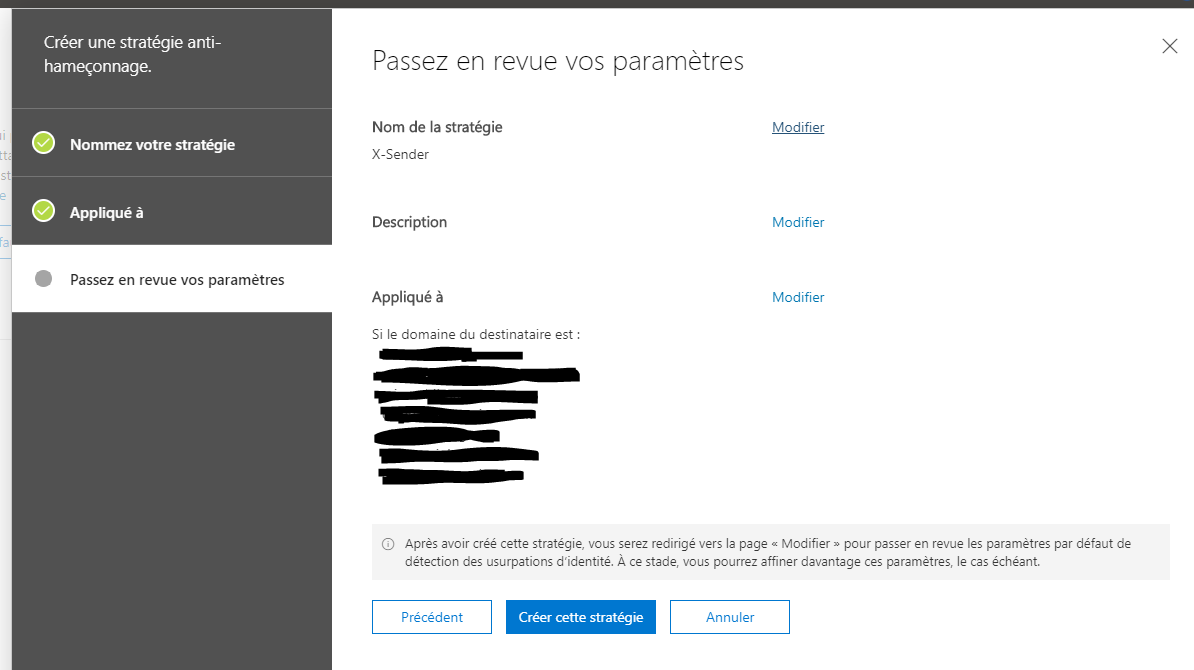
To resolve the issue I had to a antispam strategy and to make it stricter.
That way into your 0365 admin portal;
You create a antispam strategy, name it;
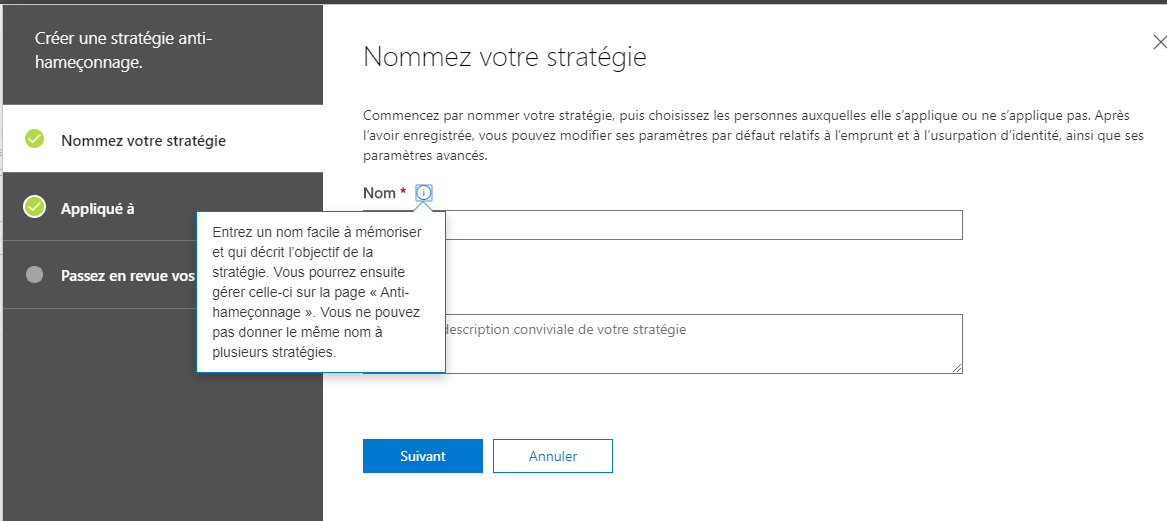
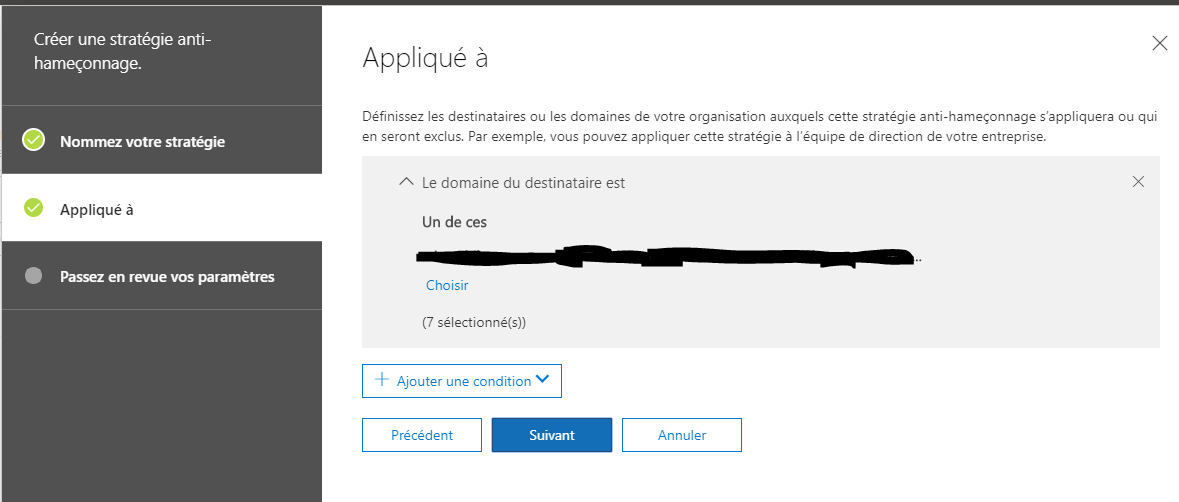
You then apply it to your accounts;
Click to create the strategy.
Thanks everyone, a small tip it's, but come handy if you receive spam/phishering email a lot, as it's not a default option ticked.
Active-Directory - Invoke-InternalEnsureADDSComponentInstallState not recognized - DCPromo
October 2, 2019, 8:41 pmHi everyone
Today I wanted to share a error I stumbled into this week.
It's after adding the ADDS's roles, in the dcpromo wizard, A Invoke-InternalEnsureADDSComponentInstallState is not recognized.
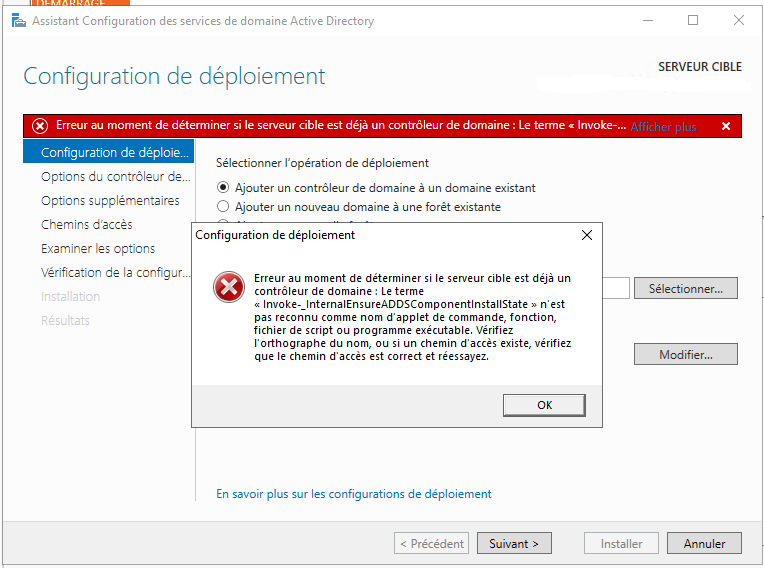
It happened to me on a Windows Server 2019.
The error was resolved by;
- Removing the dotnet feature
- Restarting
- Removing the ADDS role
-Re adding the ADDS role
- Re-running the wizard.
Kinda an easy fix, but not many people stumbled into that bug as I found almost no ressource that talk about it.
Enjoy the tip ! Thanks everyone
Edit : I had a comment that the step can break the ServerManager and other tools. I can share the link the user gave as it's good information, more for 2016. https://superuser.com/questions/1183705/install-net-framework-4-or-4-6-in-windows-server-2016
I confirm in my test ServerManager still work and I didnt seen anything broke, but it's in 2019 I did it.
Windows Server - Bitlocker - Unlock Drive
September 7, 2019, 12:00 pmHi everyone
I wanted to share a small tip today.
If you happen to have some encrypted disk with bitlocker, and you need to unluck them inside your Windows Server you might notice the unluck's option is not there by default.
You need the Feature BitLocker Drive Encryption
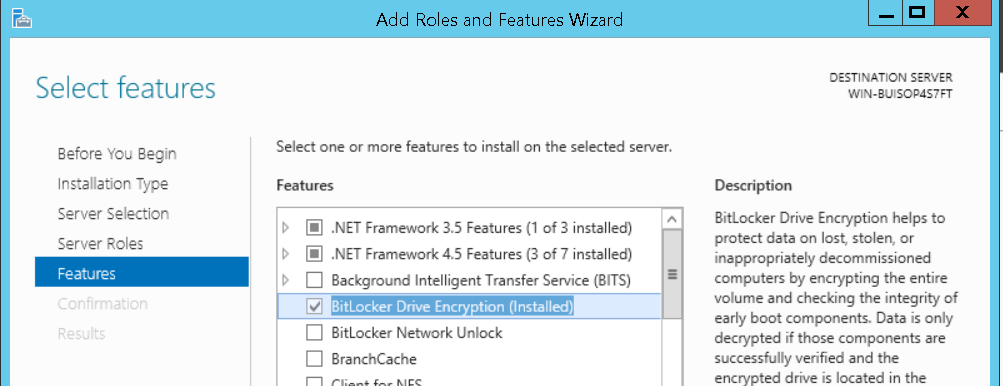
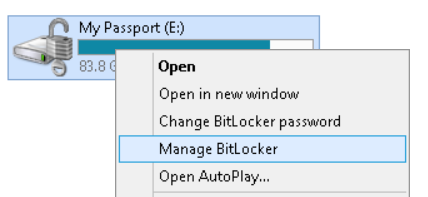
After the feature is added, you will have available all the BitLocker's option inside Explorer.
Thanks for listening to that small tip ! :)