Today I wanted to share a small and free TV app, Tele-Quebec.

The App feature two in-direct TV feed, but more importantly one dedicated to the kids and toddler in a 24/7 fashion, which is nice.
I feature it as the app is available on all platform, including the Rooku store.
In the App Store: https://apps.apple.com/ca/app/t%C3%A9l%C3%A9-qu%C3%A9bec/id690228492
In the Google Store: https://play.google.com/store/apps/details?id=tv.telequebec&hl=ln
In the Amazon Store: https://www.amazon.ca/-/fr/dp/B08T61GGGH
Some images from the appstore;


Launch of the blog series !
Hi everyone
If in a shared mailbox you need to keep the sent items in the mailbox and not just in the main account that sent the mail item, you have to make a small change via powershell. You can do the chnage in the local Outlook too, but I suggest in powershell as it will follow anyone that send from that mailbox.
There is the step;
Install-Module ExchangeOnlineManagement
Connect-ExchangeOnline -UserPrincipalName admin@account.onmicrosoft.com
Get-Mailbox
Set-Mailbox <mailbox name> -MessageCopyForSentAsEnabled $True
Set-Mailbox <mailbox name> -MessageCopyForSendOnBehalfEnabled $True
After the command we can validate the mailbox to be sure it's set, or not;
Get-Mailbox <mailbox-name> | fl
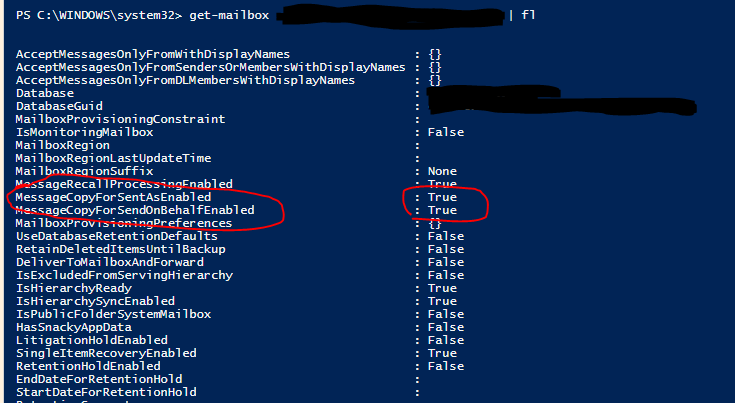
That should do the tip to have the sent items saved inside the shared mailbox sent item's folder !
Hi everyone !
I wanted to share that today Windows Server 2025 was available to test in preview !
To quote the article for the main change;
Some key improvements include:
- **Hybrid**: Adapt quickly across hybrid, cloud and edge. Easier to connect to Azure Arc to bridge on-premises and cloud-based servers. Deliver Azure capabilities to your on-premises servers.
- **Security**: Hardware and software-level security to deter cyberattacks; next-generation Active Directory that improves security and scalability. Enable a tailored security baseline and configure drift protection from the start.
- **Modern, future-ready platform**: Windows Server 2025 is now easier to upgrade and scale, with better-than-ever app compatibility. Windows Server 2025 desktop brings consistent client and server UI experience, plus conveniences like WiFi and Bluetooth.
- **Performance**: Faster and easier networking and storage; live hotpatching for reduced downtime; GPU partitioning for inferencing at the edge. Improvements in flash-based storage make Windows Server an even better platform for SQL Server.
Ref: Gain enhanced security and performance with Windows Server 2025—now in preview
Today we got some exciting news about the new Exchange features that is coming ! Finally the Exchange 2019 successor got named as Exchange Server Subscription Edition (SE).
The releasing will be in late 2025 (Q3), with a possible CU1 in Q4 of 2025.
Exchange Server 2019 will got a final CU, the CU15, that will prepare the 2019 to be Exchange Server SE.
If you are already at the latest Exchange CU, the update is like only to install a CU.

As the CU prepare the server to be ready for Exchange Server SE, some major change will happen in that CU15, as;
- Adding support for TLS1.3
- Adding back the long awaited certificate management in the EAC.
For the other minor changes and all the details, there is the link to the full article !
Exchange Server Roadmap Update
Be ready by be up to date ! and to be secure too at the same time :)
Popular Tags
Archives
-
2026 (22)
- November 2026 (1)
-
October 2026
(16)
- Blog content imported
- Added language; Hindi
- Added more contents for Polish
- App Review: Go Talk Now
- New language added; portuguese
- Website hardened for external link
- New spam for App Developper
- Website maintenance
- Tech Tip: Meraki firewall possible parental control
- New apps release for Android
- Router review - Sophos UTM
- Tech Tip: ASUS parental's control for home router
- Tech Tip: Amazon Fire Tablet Parental's control
- Youtube Restriced Mode
- Ad network for small COPPA website
- 100K visit Milestone achieved !
- September 2026 (3)
- August 2026 (2)
- 2024 (4)
-
2023 (19)
- December 2023 (2)
- October 2023 (6)
- September 2023 (2)
- July 2023 (1)
- June 2023 (1)
- May 2023 (2)
- April 2023 (1)
- February 2023 (2)
- January 2023 (2)
-
2022 (26)
- December 2022 (3)
- November 2022 (5)
- October 2022 (4)
- September 2022 (2)
- July 2022 (2)
- May 2022 (1)
- March 2022 (1)
- February 2022 (4)
- January 2022 (4)
-
2021 (15)
- December 2021 (4)
- November 2021 (1)
- October 2021 (2)
- September 2021 (1)
- August 2021 (1)
- May 2021 (1)
- April 2021 (1)
- February 2021 (1)
- January 2021 (3)
-
2020 (18)
- December 2020 (2)
- November 2020 (1)
- October 2020 (2)
- September 2020 (2)
- August 2020 (1)
- July 2020 (1)
- March 2020 (1)
- February 2020 (2)
-
January 2020
(6)
- Windows 10 IoT Terminal Deployment – Part 4 – Apps Publishing (HPDM - HP Device Manager)
- Windows 10 IoT Terminal Deployment - Part 2 - Protect the Hard Disk ? - Deploy Write Filter !
- Office 2019 / 365 Deployment
- Windows 10 IoT Terminal Deployment - Part 1 - Introduction
- Microsoft Team support for CentOS 7 / RedHat
- Prevent Office from saving to OneDrive by default
-
2019 (29)
- December 2019 (3)
- November 2019 (3)
-
October 2019
(8)
- Microsoft Q&A Launch !
- Windows Server 2019 OEM Activation problem (VM)
- StackOverflow moderation
- Microsoft Exchange Information Store Error - EventID 5003 | EventID 3154 - Time error
- Windows 10 - Update Stay at Download Waiting
- Windows Server 2019 Domain Controller - Ready for production ! (KB4516077)
- 0365 - Exchange Online X-Sender Spam Problem
- Active-Directory - Invoke-InternalEnsureADDSComponentInstallState not recognized - DCPromo
- September 2019 (1)
- August 2019 (1)
- July 2019 (2)
- April 2019 (1)
- March 2019 (1)
-
February 2019
(7)
- RDS: HP Thin OS resolution problem in Full Screen mode !
- Unable to rename domain controller: Account already exists
- Windows Update Error 80243004
- Windows 10 and the faulty network adapter
- Windows Server 2019 RDS: Install Error: dismapi_error__failed_to_enable_updates rds-web-access
- Windows Machine Unknown state on ESX
- RDS: Published App + Dell / Wyse ThinOS + Juniper DHCP relay option
- January 2019 (2)
-
2018 (28)
- December 2018 (1)
- November 2018 (6)
- October 2018 (1)
- September 2018 (2)
- August 2018 (4)
- July 2018 (2)
- May 2018 (1)
-
March 2018
(7)
- Windows 7/10 + Terminal + SmartCard Redirection with XenDesktop
- Windows 7/10, vSphere 5.5+, Citrix Desktop Studio Power State Unknown
- Logon Failure: The target account name is incorrect
- DNS Server Service - Error 1717: The interface is unknown
- Migrating files from an Active Directory Domain to another, unblocking the files ?
- Active Directory: Reset the clock on an expired password for an account
- OneDrive on Local Account ?
- February 2018 (2)
- January 2018 (2)
-
2017 (18)
- December 2017 (1)
- October 2017 (1)
- September 2017 (3)
- August 2017 (3)
- July 2017 (3)
- June 2017 (6)
- April 2017 (1)
-
2016 (26)
-
October 2016
(24)
- Windows Server - Prevent users from changing printer preferences for color
- Windows Server 2012 R2 - Firewall Logging for RDP (or any other service!)
- Windows VDA - Script to re-install the Microsoft Update add-on
- Windows VDA / Terminal Server session - Kill for good that Java update Warning !
- The Citrix purge ! part 1
- Windows - Outgoing Fax in the Console
- SQL Server 2014 on a Domain Controller ?
- Windows VDA + Pre Deploy Juniper client / Pulse Secure
- How to add non latin entry in the Windows Host file ? (%SystemRoot%\System32\drivers\etc\hosts)
- Windows Remote Desktop Service - Manually creating a .RDP file
- Microsoft Office 2013 32-bit over 64-bit error
- Windows - How to easily deploy XenApp multiple farm config for a user
- Windows Server 2012 R2 KB3185279 & KB3185331 seem to break Google tip to block Youtube with DNS
- Microsoft Offer some Virtual Machine for testing purpose
- In Windows Server 2012 R2, and error copying file name too long ?
- Windows Server - Stress that spooler ! - The terminal Server session will love you after
- Windows/Linux/BSD - How to check if the memory is functioning in ECC mode
- PowerShell - RDS - XenApp - Force password change for account near passoword expiration date
- Temporary file from UsrClass.dat (sometime associated with NTUSER.dat)
- How to export Event Viewer data to Excel with PowerShell
- Visual Studio 2015 on Windows Server 2012 R2
- Remove any trace of an Antivirus was installed (WMI)
- Windows VDA + Roaming Profile + OTP program
- Windows VDA – KMS problem - Resetting rearm count
- September 2016 (1)
- June 2016 (1)
-
October 2016
(24)
- 2015 (2)
-
2014 (5)
- November 2014 (3)
- March 2014 (1)
- January 2014 (1)
-
2013 (10)
- November 2013 (2)
- October 2013 (1)
- August 2013 (3)
- May 2013 (2)
- February 2013 (2)
- 2012 (2)
-
2011 (7)
-
June 2011
(7)
- The hypervisor was not contactable at the supplied address
- Wyse Xenith FTP bug from old firmware.. (post 1.5.xx)
- Messaging between Desktop in XenDesktop
- Unknown publisher.. small annoyance
- Best Practices for Configuring Provisioning Server on a Network
- Citrix XenDesktop and McAfee EPO script
- How to cold reset an APC ups
-
June 2011
(7)
- 2010 (2)