Hi everyone
Good news from Microsoft today, Microsoft Q&A is launched and will soon replace the Technet Forum. The direct link is there.

Good new users would be able to link to their old Technet profile in Q1 of 2020 :)
For over 10 years the MSDN and TechNet Forums played a key part in enabling our customers to unblock their business scenarios by offering a platform where technical questions could be answered by Microsoft and the community . As time progressed, and technology evolved, the needs of the community grew beyond what the existing solution could provide. We started on a journey to identify a new, robust solution which would support our need to evolve the user experience.
We’re excited to share an important milestone in the journey, introducing the preview release of Microsoft Q&A - the place to get answers to all your technical questions on Microsoft products and services.
Just wanted to share it as it's a good news, as the old forum was starting to show it's ages.
Thanks everyone, and happy hunt in the news forum :)
Hi everyone
Today I wanted to share a small tip if you got some problems with your Windows Server 2019 OEM Activation if you have OEM media.
I used the latest Dell OEM installation media in my case. When the virtual machine booted I used to get an activation error even if my key was valid.
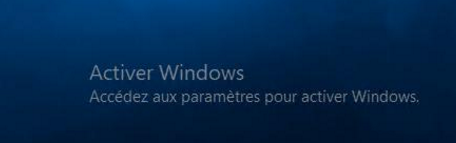
Running a slmgr /ato returned me that error;
Error: 0x8007041D on a computer running Microsoft windows non-core edition, run 'slui.exe 0x2a 0x8007041D ' to display the error text
At that point, even if I used my OEM media, I think it's possibly a manufacturer problem with the media kit as in each of my cases I used to had a pre-installed version of ESX, and I selected to had the OEM OS.
To pass the activation the tip I got was simple, to use these customs settings inside the VM .vmx or parameters;
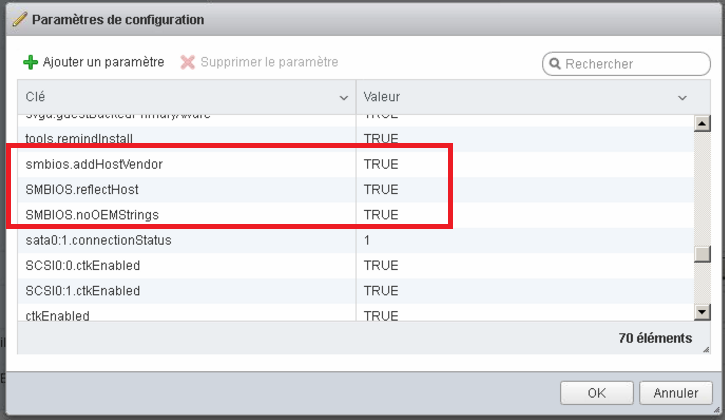
smbios.addHostVendor = TRUE
SMBIOS.reflectHost = TRUE
SMBIOS.noOEMStrings = TRUE
With those setting my virtual machine activated correctly :)
Hi everyone
This month was my one year anniversary to be a moderator on serverfault! Youpii 🎉❣️!!
I love the community and can't ask better.
Microsoft Exchange Information Store Error - EventID 5003 | EventID 3154 - Time error
October 7, 2019, 8:45 pm technologyHi everyone
On Microsoft Exchange you might fall into a strange bug if a time error happen between your DC and your server.
The error start by showing that error;

Event ID 5003, MSEchangeIS
Impossible d'initialiser le service de bande de d'information car les horloges de l'ordinateur client et du serveur sn déréglées. Le problème être dû à un changement d'heure sur l'ordinateur client ou le serveur, et un redémarrage peut être nécessaire. Vérifiez que votre domaine est configuré correctement et qu'il est actuellement en ligne.
That error may appear too;

EventID 3154, MSExchangeRepl
Active Manager n'a pas pu monter la base de données XXXXXXXX sur le serveur YYYYYYYY. Erreur: Une opération Active Manager a échoué avec une erreur provisoire. Recommencez l'opération. Erreur: Échec de l'action de base de données avec une erreur passagère. Erreur: Une erreur passagère s'est produite pendant une opération de base de données. Erreur: MapiExceptionNetworkError: Unable to make admin interface connection to server (hres:0x80040115, ec=-214221227)
To recover those erreurs you must do a net time command to sync the time with your active directory server.
net time \\DC-Server /set /y
After the net time don't forget to restart the Microsoft Exchange Active Directory Topology service;

Voila, the error will be a past memory !
Thanks !
Hi everyone
Today I wanted to share a small tip if your Windows 10 updates stay stuck at waiting download. Like shown there;
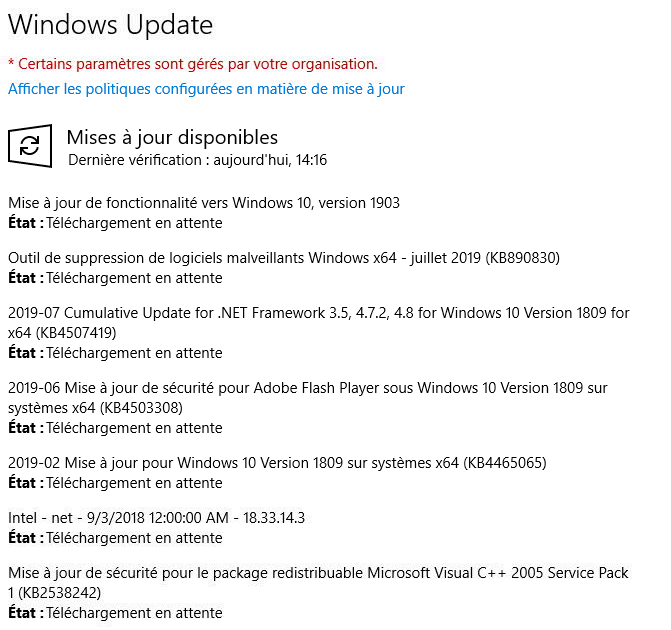
If that happen please validate your current build to be sure it's up to date, as often that error happen if one upgrade is waiting, but the update block the upgrade to run.
As such please go there to manually get the latest build; (www.microsoft.com/fr-ca/software-download/windows10)
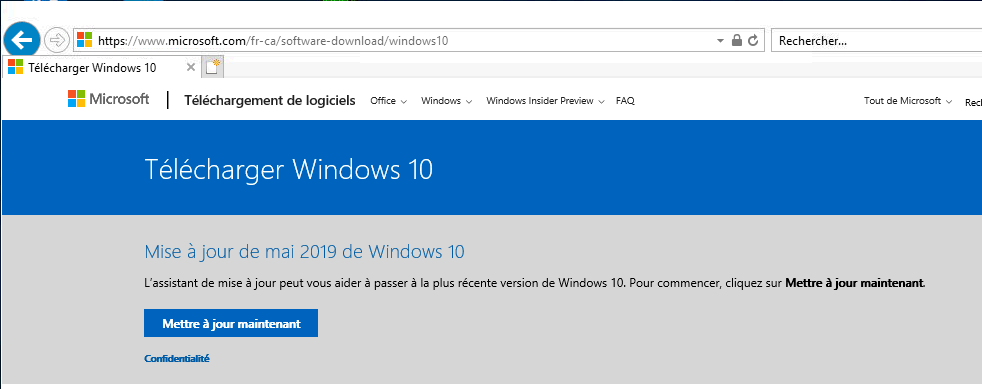
Click to download it, and please run it.

Follow that wizard;
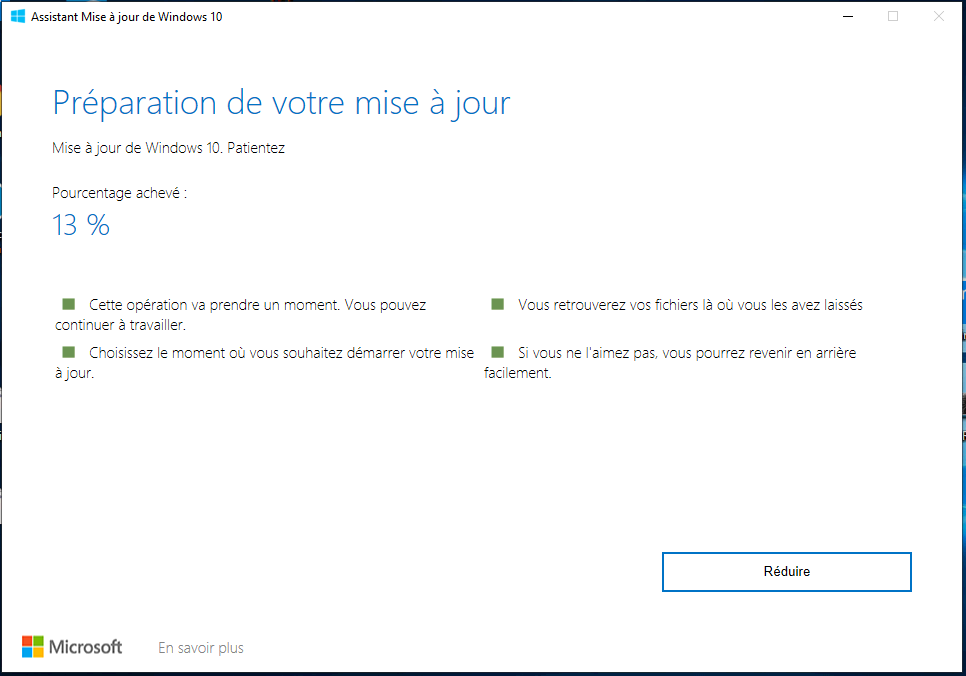
Now after the manual upgrade the next time you will run into Windows Update the waiting download will be fixed.
Thanks everyone
Popular Tags
Archives
-
2026 (22)
- November 2026 (1)
-
October 2026
(16)
- Blog content imported
- Added language; Hindi
- Added more contents for Polish
- App Review: Go Talk Now
- New language added; portuguese
- Website hardened for external link
- New spam for App Developper
- Website maintenance
- Tech Tip: Meraki firewall possible parental control
- New apps release for Android
- Router review - Sophos UTM
- Tech Tip: ASUS parental's control for home router
- Tech Tip: Amazon Fire Tablet Parental's control
- Youtube Restriced Mode
- Ad network for small COPPA website
- 100K visit Milestone achieved !
- September 2026 (3)
- August 2026 (2)
- 2024 (4)
-
2023 (19)
- December 2023 (2)
- October 2023 (6)
- September 2023 (2)
- July 2023 (1)
- June 2023 (1)
- May 2023 (2)
- April 2023 (1)
- February 2023 (2)
- January 2023 (2)
-
2022 (26)
- December 2022 (3)
- November 2022 (5)
- October 2022 (4)
- September 2022 (2)
- July 2022 (2)
- May 2022 (1)
- March 2022 (1)
- February 2022 (4)
- January 2022 (4)
-
2021 (15)
- December 2021 (4)
- November 2021 (1)
- October 2021 (2)
- September 2021 (1)
- August 2021 (1)
- May 2021 (1)
- April 2021 (1)
- February 2021 (1)
- January 2021 (3)
-
2020 (18)
- December 2020 (2)
- November 2020 (1)
- October 2020 (2)
- September 2020 (2)
- August 2020 (1)
- July 2020 (1)
- March 2020 (1)
- February 2020 (2)
-
January 2020
(6)
- Windows 10 IoT Terminal Deployment – Part 4 – Apps Publishing (HPDM - HP Device Manager)
- Windows 10 IoT Terminal Deployment - Part 2 - Protect the Hard Disk ? - Deploy Write Filter !
- Office 2019 / 365 Deployment
- Windows 10 IoT Terminal Deployment - Part 1 - Introduction
- Microsoft Team support for CentOS 7 / RedHat
- Prevent Office from saving to OneDrive by default
-
2019 (29)
- December 2019 (3)
- November 2019 (3)
-
October 2019
(8)
- Microsoft Q&A Launch !
- Windows Server 2019 OEM Activation problem (VM)
- StackOverflow moderation
- Microsoft Exchange Information Store Error - EventID 5003 | EventID 3154 - Time error
- Windows 10 - Update Stay at Download Waiting
- Windows Server 2019 Domain Controller - Ready for production ! (KB4516077)
- 0365 - Exchange Online X-Sender Spam Problem
- Active-Directory - Invoke-InternalEnsureADDSComponentInstallState not recognized - DCPromo
- September 2019 (1)
- August 2019 (1)
- July 2019 (2)
- April 2019 (1)
- March 2019 (1)
-
February 2019
(7)
- RDS: HP Thin OS resolution problem in Full Screen mode !
- Unable to rename domain controller: Account already exists
- Windows Update Error 80243004
- Windows 10 and the faulty network adapter
- Windows Server 2019 RDS: Install Error: dismapi_error__failed_to_enable_updates rds-web-access
- Windows Machine Unknown state on ESX
- RDS: Published App + Dell / Wyse ThinOS + Juniper DHCP relay option
- January 2019 (2)
-
2018 (28)
- December 2018 (1)
- November 2018 (6)
- October 2018 (1)
- September 2018 (2)
- August 2018 (4)
- July 2018 (2)
- May 2018 (1)
-
March 2018
(7)
- Windows 7/10 + Terminal + SmartCard Redirection with XenDesktop
- Windows 7/10, vSphere 5.5+, Citrix Desktop Studio Power State Unknown
- Logon Failure: The target account name is incorrect
- DNS Server Service - Error 1717: The interface is unknown
- Migrating files from an Active Directory Domain to another, unblocking the files ?
- Active Directory: Reset the clock on an expired password for an account
- OneDrive on Local Account ?
- February 2018 (2)
- January 2018 (2)
-
2017 (18)
- December 2017 (1)
- October 2017 (1)
- September 2017 (3)
- August 2017 (3)
- July 2017 (3)
- June 2017 (6)
- April 2017 (1)
-
2016 (26)
-
October 2016
(24)
- Windows Server - Prevent users from changing printer preferences for color
- Windows Server 2012 R2 - Firewall Logging for RDP (or any other service!)
- Windows VDA - Script to re-install the Microsoft Update add-on
- Windows VDA / Terminal Server session - Kill for good that Java update Warning !
- The Citrix purge ! part 1
- Windows - Outgoing Fax in the Console
- SQL Server 2014 on a Domain Controller ?
- Windows VDA + Pre Deploy Juniper client / Pulse Secure
- How to add non latin entry in the Windows Host file ? (%SystemRoot%\System32\drivers\etc\hosts)
- Windows Remote Desktop Service - Manually creating a .RDP file
- Microsoft Office 2013 32-bit over 64-bit error
- Windows - How to easily deploy XenApp multiple farm config for a user
- Windows Server 2012 R2 KB3185279 & KB3185331 seem to break Google tip to block Youtube with DNS
- Microsoft Offer some Virtual Machine for testing purpose
- In Windows Server 2012 R2, and error copying file name too long ?
- Windows Server - Stress that spooler ! - The terminal Server session will love you after
- Windows/Linux/BSD - How to check if the memory is functioning in ECC mode
- PowerShell - RDS - XenApp - Force password change for account near passoword expiration date
- Temporary file from UsrClass.dat (sometime associated with NTUSER.dat)
- How to export Event Viewer data to Excel with PowerShell
- Visual Studio 2015 on Windows Server 2012 R2
- Remove any trace of an Antivirus was installed (WMI)
- Windows VDA + Roaming Profile + OTP program
- Windows VDA – KMS problem - Resetting rearm count
- September 2016 (1)
- June 2016 (1)
-
October 2016
(24)
- 2015 (2)
-
2014 (5)
- November 2014 (3)
- March 2014 (1)
- January 2014 (1)
-
2013 (10)
- November 2013 (2)
- October 2013 (1)
- August 2013 (3)
- May 2013 (2)
- February 2013 (2)
- 2012 (2)
-
2011 (7)
-
June 2011
(7)
- The hypervisor was not contactable at the supplied address
- Wyse Xenith FTP bug from old firmware.. (post 1.5.xx)
- Messaging between Desktop in XenDesktop
- Unknown publisher.. small annoyance
- Best Practices for Configuring Provisioning Server on a Network
- Citrix XenDesktop and McAfee EPO script
- How to cold reset an APC ups
-
June 2011
(7)
- 2010 (2)