Remove any trace of an Antivirus was installed (WMI)
October 20, 2016, 3:02 amHi everyone
Today I will give a small tip if you get a problem re-installing an antivirus, and it complain about there is already's one installed or if the maintenance center list one no longer there.
Sometime it can happen that a small line is still in the WMI's database and you can confirm it by running this command;
Get-WmiObject -Namespace root\SecurityCenter2 -Class AntiVirusProductIf it list a product no longer installed, then you can run that script to remove any invalid's entry there;
It will remove the entry that bug, antivirus WMI class in SecurityCenter/SecurityCenter2.
A powershell code;
Get-WmiObject -Namespace root\SecurityCenter2 -Class AntiVirusProduct | ForEach-Object{$_.Delete()} A scripted version;
On Error Resume Next

Set shell = CreateObject("WScript.Shell")
Set getOSVersion = shell.exec("%comspec% /c ver")
version = getOSVersion.stdout.readall

Select Case True
   Case InStr(version, "n 5.") > 1 : GetOS = 0 'pre vista
   Case InStr(version, "n 6.") > 1 : GetOS = 1 'vista/post vista
   Case Else : GetOS = -1
End Select

strComputer = "."
If GetOS = 0 Then
    Set oWMI = GetObject( _
      "winmgmts:{impersonationLevel=impersonate}!\\" & strComputer & "\root\SecurityCenter")

    Set colItems = oWMI.ExecQuery("Select * from AntiVirusProduct")

    For Each objItem In colItems
        objItem.Delete_
    Next
End If

If GetOS = 1 Then
    Set oWMI = GetObject( _
      "winmgmts:{impersonationLevel=impersonate}!\\" & strComputer & "\root\SecurityCenter2")

    Set colItems = oWMI.ExecQuery("Select * from AntiVirusProduct")

    For Each objItem In colItems
        objItem.Delete_
    Next

End If
Scripted method from there
Thanks
Windows VDA + Roaming Profile + OTP program
October 19, 2016, 6:07 pmHi everyone!
You use roaming profile, a VDA’s system with machine hosted in a cloud and you use a mobile OTP’s program like CA ArcoID OTP inside the desktop? Does it bug and keep locking your key for your users, what to do !!?
Well, look no further, I have the solution.
The problem is actually the OTP program that add a master key locally and in the user profile when you add the device. The problem arise when the user log into another computer, the roaming profile bring back the device configuration from the HCU registry's hive but the masterkey.dat locally is not the same. If one of those key change, the system will generate random number like usual without any warning, but they will not work. (As the key differ).
- First be sure all users got a home folder.
- Now we start, install the OTP’s app in the golden image. (https://support.ca.com/cadocs/0/CA%20RiskMinder%203%201-ENU/Bookshelf_Files/PDF/OTPClient_INSTALL_ENU.pdf)
- Navigate there; c:\Users\Public\CA.
- Copy the ArcotLow’s folder content. It should contain an empty keys.dat and masterkey.dat.
- Copy those file on the user share
- Rename the ArcotLow's folder.
- After open a command prompt in c:\Users\Public\CA
- Run mklink /d ArcotLow x:\ (where x:\ is the home folder)
- Close the golden image, it’s now finish !
Now you can enjoy the OTP’s program that will list the same number than the OTP’s program on your phone in example :)
Thanks
Philippe
Windows VDA – KMS problem - Resetting rearm count
October 19, 2016, 4:12 pmHi everyone !
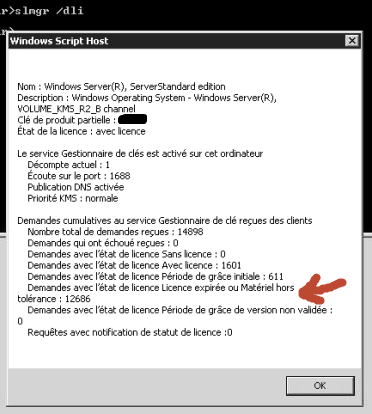
Today I will talk about a problem I seen often if you manage a big streamed virtual desktop's group. The loss of the KMS's activation, not due to a Windows's problem, but a problem with the streaming software that does not generate unique KMS's key.
An example of bad health on the KMS's host; ...
Open the Provisioning Services Console

Mount a vdisk in maintenance's mode

Use regedit, click HKLM->Load Hive, and open in the new attached partition the SYSTEM's file.

Give it a temporary name

Naviguate to HKLM\WPA, and erase that folder completely.

Now unmounts the vdisk.

After load the virtual machine up.
Issue that command; slmgr /rearm, and close the VM.
Now watch your KMs's host event log, unique ID should be displayed :)
Now it's finished :)
Thanks !
Philippe
GNU Multiple Precision Arithmetic Library 6.1.1 for Visual Studio 2015
September 8, 2016, 2:24 amA small tip outside my expertise, enjoy.
For building GMP (GNU Multiple Precision Arithmetic Library, http://gmplib.org) under Windows you can follow theses easy step;
- Get latest GMP [source][1].
- Create a folder to store your GMP's library (example C:\gmp)
- Get [MinGW][2].
- Do a full install of MinGW. (+-400m)
- Run msys.bat from C:\MinGW\msys\1.0 if you installed in the default directory.
- Run ./configure --prefix=/c/GMP --build=x86_64-w64-mingw32 --host=x86_64-w64-mingw32 -disable-static --enable-shared. Please note there I didn't used --enable-cxx as the c++ module does not seem to compile well with the new GMP's library. (It reference inttypes.h that mingw can't find)
- Run make
- Run make install
-Run dumpbin /exports libgmp-10.dll >libgmp-10.exports
-Edit the file libgmp-10.exports to leave there only the function name.
-Run lib /def:libgmp-10.def /out:libgmp-10.lib
and voila, you are done.
You will have a .h and a .lib library that you can link to Visual Studio like a .lib.
[1]: http://gmplib.org
[2]: http://sourceforge.net/projects/ming
Office 2016 Error: We re sorry but this feature appears to be broken and needs to be repaired. Use the Programs and Features option in the Windows Control Panel to repair Microsoft Office.
June 21, 2016, 3:46 pmHi everyone. I'am writing this KB's up, as I didnt seen it yet on Microsoft. So if you land there for that error, enjoy the workaround. (This bug appeared to me on a Microsoft Windows Server 2012 R2 with Terminal Service activated)\
Introduction
You install Office 2016 on a computer and only Word 2016 give you an error when you try to open it.
As a local admin you don't see the error.
Symptom
You receive the error : "We're sorry but this feature appears to be broken and needs to be repaired. Use the Programs and Features option in the Windows Control Panel to repair Microsoft Office." when you try to open Word 2016.
Other Office 2016's product are not affected.
Resolution
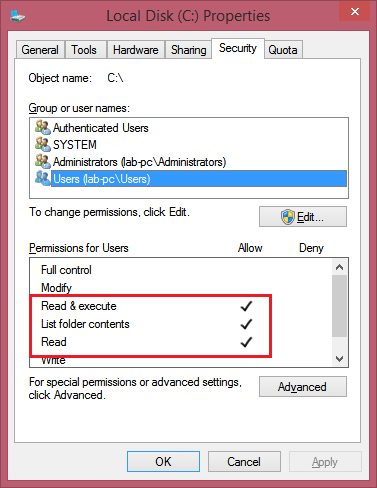
Word 2016 do a file check on the C:\, if the user launching Word 2016 does not have Read Access to the C:\ Word 2016 give the error.
This happen if the default right got changed. The setting must be like that:
Related KB