Hi everyone
Today I will cover a topic that will fall into multiple subject and that not many blogger talk about; How to plan and deploy a lot of Windows 10 IoT terminals
In my test I used the new HP ThinClient (t430) that is bundle that way;
The look is that way; as you can see it's really small and built to be flexible where to install, like able to fix them to the back of the monitor if needed.
It's a handy device for place like a public library
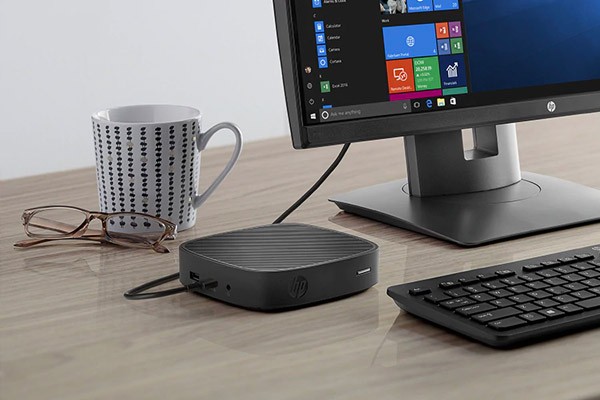
These thin client advantage is that they come shipped with some management software and come with the full Windows 10 feature set. The Windows IoT for that model is an Windows 10 Enterprise LTSB build 1609.
Pre deployment, you have some questions to ask yourself;
- To protect the system drive; do you plan to use HP Write Filter (HPWF) or Microsoft Unified Write Manager (UWF) out of the box ? or to use another product (like DeepFreeze)
- Where the user profile would be stored ? Roaming profile, Mandatory profile, Redirected folder, etc...
- As by default the system drive is locked (HPWF or UWF), do you plan to write exception for the user profile if it's not a roaming profile ?
- How you will plan to deploy software, HP Device Manager, or with GPO ?
- As the device ram can be limited, and the system drive locked, do you plan to deploy a RDS server to deploy additional applications to the users ?
Some limitation you need to know before the deployment;
- The HPWF or UWF by default use a part of the RAM to store the files activities, which can limit what you use on the terminal.
- If you use a locked drive, you need to think for antivirus update, where you store them, so the machine could store the data (Write filter exception or thawed space)
- Windows Update need to be planned as by default the terminal does not update itself. So you must do sequential task usually to allow the Windows update install to stay inside the machine.
As you can see, to deploy such solution bring some questions, but in the end to think it before a deployment is the best course of actions, as it will lead to good user feedback in the end.
Thanks, and stay tuned for other articles coming soon !
I will talk next on how to deploy the machine + autojoin to the domain (part 3), how to manage and control the write filters with example (part 2) :)
Windows 10 IoT Terminal Deployment – Part 2 – Protect the Hard Disk ? – Deploy Write Filter !
Popular Tags
Archives
-
2026 (23)
- November 2026 (3)
-
October 2026
(15)
- Blog content imported
- Added language; Hindi
- Added more contents for Polish
- App Review: Go Talk Now
- New language added; portuguese
- Website hardened for external link
- New spam for App Developper
- Website maintenance
- Tech Tip: Meraki firewall possible parental control
- New apps release for Android
- Router review - Sophos UTM
- Tech Tip: ASUS parental's control for home router
- Tech Tip: Amazon Fire Tablet Parental's control
- Youtube Restriced Mode
- 100K visit Milestone achieved !
- September 2026 (3)
- August 2026 (2)
- 2024 (4)
-
2023 (19)
- December 2023 (2)
- October 2023 (6)
- September 2023 (2)
- July 2023 (1)
- June 2023 (1)
- May 2023 (2)
- April 2023 (1)
- February 2023 (2)
- January 2023 (2)
-
2022 (26)
- December 2022 (3)
- November 2022 (5)
- October 2022 (4)
- September 2022 (2)
- July 2022 (2)
- May 2022 (1)
- March 2022 (1)
- February 2022 (4)
- January 2022 (4)
-
2021 (15)
- December 2021 (4)
- November 2021 (1)
- October 2021 (2)
- September 2021 (1)
- August 2021 (1)
- May 2021 (1)
- April 2021 (1)
- February 2021 (1)
- January 2021 (3)
-
2020 (18)
- December 2020 (2)
- November 2020 (1)
- October 2020 (2)
- September 2020 (2)
- August 2020 (1)
- July 2020 (1)
- March 2020 (1)
- February 2020 (2)
-
January 2020
(6)
- Windows 10 IoT Terminal Deployment – Part 4 – Apps Publishing (HPDM - HP Device Manager)
- Windows 10 IoT Terminal Deployment - Part 2 - Protect the Hard Disk ? - Deploy Write Filter !
- Office 2019 / 365 Deployment
- Windows 10 IoT Terminal Deployment - Part 1 - Introduction
- Microsoft Team support for CentOS 7 / RedHat
- Prevent Office from saving to OneDrive by default
-
2019 (29)
- December 2019 (3)
- November 2019 (3)
-
October 2019
(8)
- Microsoft Q&A Launch !
- Windows Server 2019 OEM Activation problem (VM)
- StackOverflow moderation
- Microsoft Exchange Information Store Error - EventID 5003 | EventID 3154 - Time error
- Windows 10 - Update Stay at Download Waiting
- Windows Server 2019 Domain Controller - Ready for production ! (KB4516077)
- 0365 - Exchange Online X-Sender Spam Problem
- Active-Directory - Invoke-InternalEnsureADDSComponentInstallState not recognized - DCPromo
- September 2019 (1)
- August 2019 (1)
- July 2019 (2)
- April 2019 (1)
- March 2019 (1)
-
February 2019
(7)
- RDS: HP Thin OS resolution problem in Full Screen mode !
- Unable to rename domain controller: Account already exists
- Windows Update Error 80243004
- Windows 10 and the faulty network adapter
- Windows Server 2019 RDS: Install Error: dismapi_error__failed_to_enable_updates rds-web-access
- Windows Machine Unknown state on ESX
- RDS: Published App + Dell / Wyse ThinOS + Juniper DHCP relay option
- January 2019 (2)
-
2018 (28)
- December 2018 (1)
- November 2018 (6)
- October 2018 (1)
- September 2018 (2)
- August 2018 (4)
- July 2018 (2)
- May 2018 (1)
-
March 2018
(7)
- Windows 7/10 + Terminal + SmartCard Redirection with XenDesktop
- Windows 7/10, vSphere 5.5+, Citrix Desktop Studio Power State Unknown
- Logon Failure: The target account name is incorrect
- DNS Server Service - Error 1717: The interface is unknown
- Migrating files from an Active Directory Domain to another, unblocking the files ?
- Active Directory: Reset the clock on an expired password for an account
- OneDrive on Local Account ?
- February 2018 (2)
- January 2018 (2)
-
2017 (18)
- December 2017 (1)
- October 2017 (1)
- September 2017 (3)
- August 2017 (3)
- July 2017 (3)
- June 2017 (6)
- April 2017 (1)
-
2016 (26)
-
October 2016
(24)
- Windows Server - Prevent users from changing printer preferences for color
- Windows Server 2012 R2 - Firewall Logging for RDP (or any other service!)
- Windows VDA - Script to re-install the Microsoft Update add-on
- Windows VDA / Terminal Server session - Kill for good that Java update Warning !
- The Citrix purge ! part 1
- Windows - Outgoing Fax in the Console
- SQL Server 2014 on a Domain Controller ?
- Windows VDA + Pre Deploy Juniper client / Pulse Secure
- How to add non latin entry in the Windows Host file ? (%SystemRoot%\System32\drivers\etc\hosts)
- Windows Remote Desktop Service - Manually creating a .RDP file
- Microsoft Office 2013 32-bit over 64-bit error
- Windows - How to easily deploy XenApp multiple farm config for a user
- Windows Server 2012 R2 KB3185279 & KB3185331 seem to break Google tip to block Youtube with DNS
- Microsoft Offer some Virtual Machine for testing purpose
- In Windows Server 2012 R2, and error copying file name too long ?
- Windows Server - Stress that spooler ! - The terminal Server session will love you after
- Windows/Linux/BSD - How to check if the memory is functioning in ECC mode
- PowerShell - RDS - XenApp - Force password change for account near passoword expiration date
- Temporary file from UsrClass.dat (sometime associated with NTUSER.dat)
- How to export Event Viewer data to Excel with PowerShell
- Visual Studio 2015 on Windows Server 2012 R2
- Remove any trace of an Antivirus was installed (WMI)
- Windows VDA + Roaming Profile + OTP program
- Windows VDA – KMS problem - Resetting rearm count
- September 2016 (1)
- June 2016 (1)
-
October 2016
(24)
- 2015 (2)
-
2014 (5)
- November 2014 (3)
- March 2014 (1)
- January 2014 (1)
-
2013 (10)
- November 2013 (2)
- October 2013 (1)
- August 2013 (3)
- May 2013 (2)
- February 2013 (2)
- 2012 (2)
-
2011 (7)
-
June 2011
(7)
- The hypervisor was not contactable at the supplied address
- Wyse Xenith FTP bug from old firmware.. (post 1.5.xx)
- Messaging between Desktop in XenDesktop
- Unknown publisher.. small annoyance
- Best Practices for Configuring Provisioning Server on a Network
- Citrix XenDesktop and McAfee EPO script
- How to cold reset an APC ups
-
June 2011
(7)
- 2010 (2)