Windows Server - Prevent users from changing printer preferences for color
October 25, 2016, 3:05 amThis post is created because I see a lot of demand on the forum to be able to block the color usage of some printers by blocking the user to change the printer preference.
At first I will tell that the driver make a huge difference, any option available in the preference's windows are available to the user, as they are mapped under the HCU of the user.
Sadly, but necessary to tell it, the easiest way to block that is to buy a printer that got the accounting module in it to be able to ask for a PIN for the color's usage. The driver is usually wrote to allow the user to enter the PIN when it detect that it's a color printout. Some model will ask the PIN locally on the touch screen.
Now some workaround:
First, we block the color usage in the printer's configuration.
Now if we use GPP in example to deploy the printer, please set it to replace. It will replace existing setting at each GPO refresh's interval. (by default 90 minutes)
Delete and recreate the shared printer connection. The net result of the Replace action overwrites all existing settings associated with the shared printer connection. If the shared printer connection does not exist, then the Replace action creates a new shared printer connection.
We could add the Printer only at each logon too in replace's mode.
I suggest that GPO below. That will prevent any user to manually add a printer into their computer to bypass our restriction. That will force the user to use published printer. As when the printer got connected the computer, the print driver got pushed, thus it open a door to allow a non-admin user to add the printer.
User Configuration--> Administrative Templates --> Control Panel --> Printers --> Prevent addition of printers --> Enable
Last workaround, block the color usage in the printer itself if you can.
As you can see there is not much tip to prevent the user, but as said it exist some workaround.
Thanks
Windows Server 2012 R2 - Firewall Logging for RDP (or any other service!)
October 25, 2016, 2:53 amWant to restrict a public service in your server ?
Today I'am giving a small tip if your router does not allow access-list, so we will do it at 100% from the server's side.
Let's start with an example with RDP.
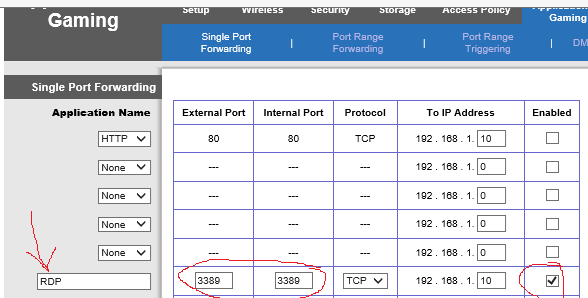
We start by forwarding the port 3389 to our server. An example below with a small Linksys.
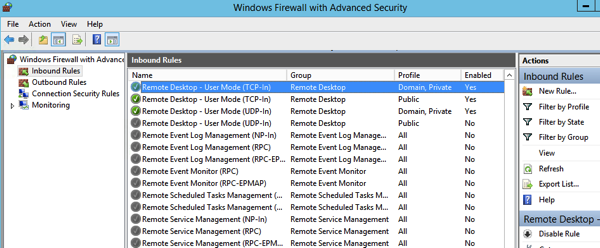
In the Windows Firewall we check if RDP is Allowed and we can click to allow only the specified IP's range.
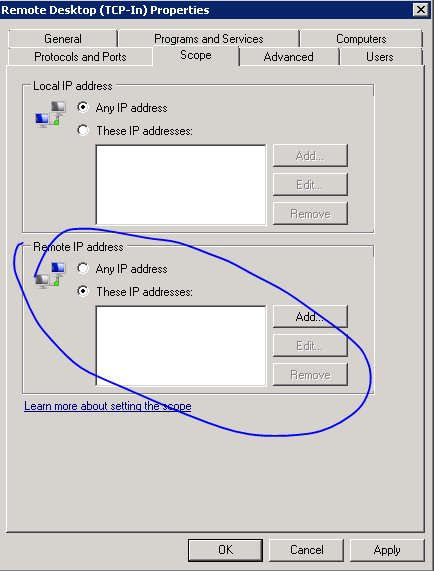
In the screen below we enter the wanted IP's group. (For me it was my local ISP range (pic source)
Now the more obscure step, we gonna configure our firewall to log blocked entry. The firewall's log is found there by default: %windir%\system32\logfiles\firewall\pfirewall.log.
We execute that query to allow the log be be fill with DROP'ed connection attempt.
netsh advfirewall set allprofiles logging droppedconnections enable
After a while if our rule work correctly, our log should show some blocked attempt.
2016-10-22 10:02:35 DROP TCP 179.43.149.5 192.168.1.10 26286 3389 52 S 2834367233 0 8192 - - - RECEIVE
2016-10-22 11:34:48 DROP TCP 185.93.185.7 192.168.1.10 45610 3389 40 S 3512451859 0 1024 - - - RECEIVE
2016-10-22 11:44:54 DROP TCP 47.18.154.28 192.168.1.10 48447 3389 40 S 763731365 0 1024 - - - RECEIVE
2016-10-22 12:03:24 DROP TCP 171.8.0.87 192.168.1.10 30612 3389 40 S 1989410816 0 16384 - - - RECEIVE
2016-10-22 12:42:31 DROP TCP 104.223.180.20 192.168.1.10 60328 3389 40 S 3936878592 0 16384 - - - RECEIVE
2016-10-22 14:04:36 DROP TCP 183.60.48.25 192.168.1.10 12213 3389 40 S 62195378 0 8192 - - - RECEIVE
2016-10-22 15:02:26 DROP TCP 61.240.144.65 192.168.1.10 42805 3389 40 S 2066287928 0 1024 - - - RECEIVE
At this step if our IP's range is correctly setupped, we can be more secure on the internet, and don't worry to see connection attempt, a lot of bot/robot try to scan well know port.
Thanks !
Windows VDA - Script to re-install the Microsoft Update add-on
October 25, 2016, 2:02 amIf someday you fall on a machine that the Microsoft Update does not want to install for a reason X, there is a quick fix for that issue.
There is the script to run to enable it :
Set ServiceManager = CreateObject("Microsoft.Update.ServiceManager")
ServiceManager.ClientApplicationID = "My App"
‘add the Microsoft Update Service by GUID
Set NewUpdateService = ServiceManager.AddService2("7971f918-a847-4430-9279-4a52d1efe18d",7,"")
There is the script to disable it :
Set ServiceManager = CreateObject("Microsoft.Update.ServiceManager")
ServiceManager.ClientApplicationID = "My App"
‘remove the Microsoft Update Service by GUID
ServiceManager.RemoveService("7971f918-a847-4430-9279-4a52d1efe18d")
Thanks !
Windows VDA / Terminal Server session - Kill for good that Java update Warning !
October 25, 2016, 1:41 amEver wonder how to really kill that java updater that keep returning back into your Windows VDA start up or within your users Terminal Session ?
Justcheck.exe scheduler do an online check, but java got another method too, with an expiration date of the product.
First, create that environment variable:
setx deployment.expiration.check.enabled false /m
After lets go there; c:\windows\sun\java
Create Deployment.config file
Enter that into it:
deployment.system.config=file\:C\:/Windows/Sun/Java/Deployment/deployment.properties
deployment.system.config.mandatory=true
Create Deployment.properties file
deployment.javaws.autodownload=never
deployment.javaws.autodownload.locked
deployment.expiration.check.enabled=false
deployment.expiration.check.enabled.locked
deployment.expiration.check.enabled.locked
deployment.expiration.decision=never
deployment.expiration.decision.locked
deployment.expiration.decision.suppression=true
deployment.expiration.decision.suppression.locked
Thanks :) and enjoy the tip
The Citrix purge ! part 1
October 25, 2016, 1:18 amThere is part #1 of a series of some blog I will write to counter the great purge citrix started to remove some of their CTX from the Internet.. (I have no idea why they do so, but the information was still handy even today)
The first tip I will share I can't find the CTX number it was under... (no longer indexed)
Latency when using Receiver 3+ when connecting to an old farm...
If you have to still connect to an old farm, and your keyboard really lag, and your mouse, make sure that registry key is there in your client;
32bit
\[HKEY_LOCAL_MACHINE\SOFTWARE\Citrix\ICA Client\Engine\Lockdown Profiles\All Regions\Lockdown\Virtual Channels\Seamless Windows\]"DeferredUpdateMode"="False"
64bit
\[HKEY_LOCAL_MACHINE\SOFTWARE\Wow6432Node\Citrix\ICA Client\Engine\Lockdown Profiles\All Regions\Lockdown\Virtual Channels\Seamless Windows\]"DeferredUpdateMode"="False"