Office 2016 Error: We re sorry but this feature appears to be broken and needs to be repaired. Use the Programs and Features option in the Windows Control Panel to repair Microsoft Office.
June 21, 2016, 3:46 pmHi everyone. I'am writing this KB's up, as I didnt seen it yet on Microsoft. So if you land there for that error, enjoy the workaround. (This bug appeared to me on a Microsoft Windows Server 2012 R2 with Terminal Service activated)\
Introduction
You install Office 2016 on a computer and only Word 2016 give you an error when you try to open it.
As a local admin you don't see the error.
Symptom
You receive the error : "We're sorry but this feature appears to be broken and needs to be repaired. Use the Programs and Features option in the Windows Control Panel to repair Microsoft Office." when you try to open Word 2016.
Other Office 2016's product are not affected.
Resolution
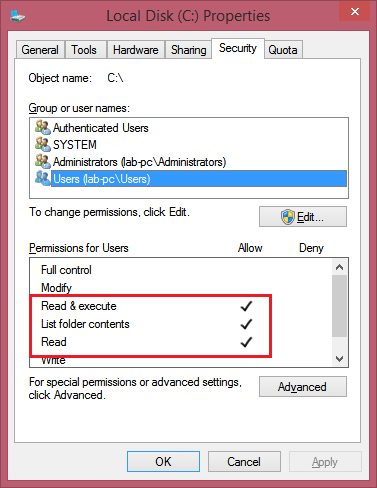
Word 2016 do a file check on the C:\, if the user launching Word 2016 does not have Read Access to the C:\ Word 2016 give the error.
This happen if the default right got changed. The setting must be like that:
Related KB
Internet Explorer: Make it work with old certificate
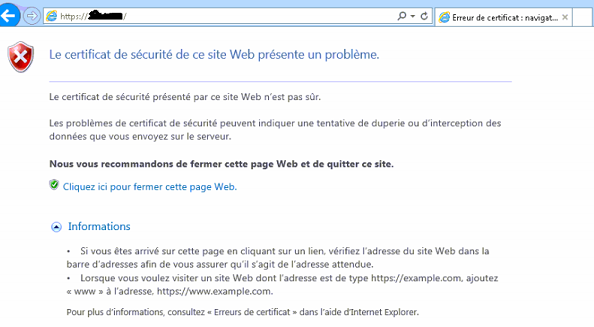
June 21, 2015, 2:21 pmDo you happen to have a old appliance that you can't change the certificate in it, and now it does not what to work in Internet Explorer ? then the tip is for you.
Symptom : You can't process to the website as the certificate is tagged invalid.
Correction
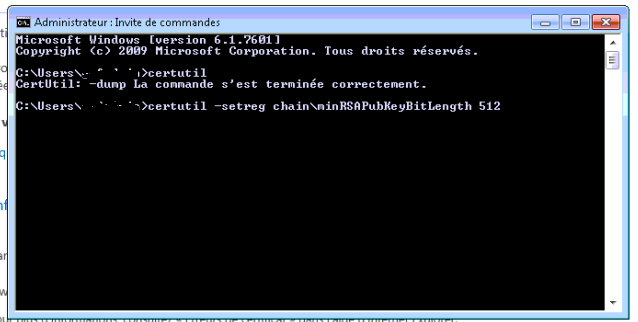
Open a command prompt
Enter that command: certutil -setreg chain\minRSAPubKeyBitLenght 512
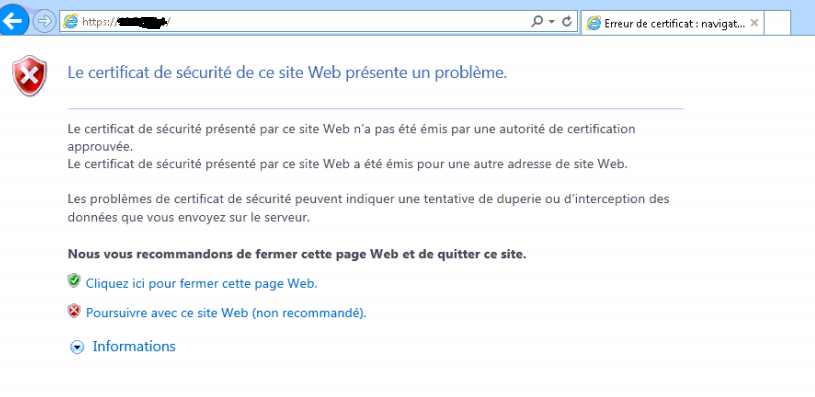
Now; atleast you can hit to continue to the website.
Symantec new technote ! V-225-302 for BackupExec 2014
January 28, 2015, 8:58 pmHi everyone! Today I found a new bug and the page at symantec does not exist yet.
I decided to create it for them, as it can be a error other will see. It happened on Windows Server 2012 R2 in case it has an importance.
Note: The log show the link http://entsupport.symantec.com/umi/V-225-302. At this time this error is not classified.
Symptom: You install BE2014 on a new system and the installation fail with the error code V-225-302
Error: V-225-302: ERROR: Failed to install SQL Express BKUPEXEC instance with error -2067922940.
Corrective Step: Pre-install the SQLExpress with the /SKIPRULES=PerfMonCounterNotCorruptedCheck parameter.
- Locate the SQL install string in the error log; it would look like that (see there for the location);
"G:\BE\WINNT\INSTALL\SQLExpress\SQLEXPR_x86_ENU.exe" /ACTION=Install /Q /Hideconsole /SkipRules=RebootRequiredCheck /FEATURES=SQL /INSTANCENAME=BKUPEXEC /SQLSVCACCOUNT="AUTORITE NT\Système" /SQLSVCStartupType=Automatic /ENABLERANU=0 /TCPENABLED="1" /NPENABLED="0" /INSTANCEDIR="C:\Program Files\Microsoft SQL Server" /SQLSYSADMINACCOUNTS="BUILTIN\ADMINISTRATORS" /IACCEPTSQLSERVERLICENSETERM
- In my case change the account information, /SQLSVCACCOUNT="AUTORITE NT\Système" for /SQLSVCACCOUNT="NT AUTHORITY\System". A setup error for localisation.
- Add the new command line and launch the full command. From run
"G:\BE\WINNT\INSTALL\SQLExpress\SQLEXPR_x86_ENU.exe" /ACTION=Install /Q /Hideconsole /SkipRules=RebootRequiredCheck /FEATURES=SQL /INSTANCENAME=BKUPEXEC /SQLSVCACCOUNT="NT AUTHORITY\System" /SQLSVCStartupType=Automatic /ENABLERANU=0 /TCPENABLED="1" /NPENABLED="0" /INSTANCEDIR="C:\Program Files\Microsoft SQL Server" /SQLSYSADMINACCOUNTS="BUILTIN\ADMINISTRATORS" /IACCEPTSQLSERVERLICENSETERMS /SKIPRULES=PerfMonCounterNotCorruptedCheck
- Run and wait, as it will run silent.
- Re-run the BE setup after.
Windows Server: Remote Desktop Error: The task you are trying to do cant be completed because Remote Desktop Services is currently busy
November 29, 2014, 3:36 amHi everyone
Today I will talk about a tip to kill / reset any RDP session when it's locked out and that give the error "The task you are trying to do can't be completed because Remote Desktop Services is currently busy"
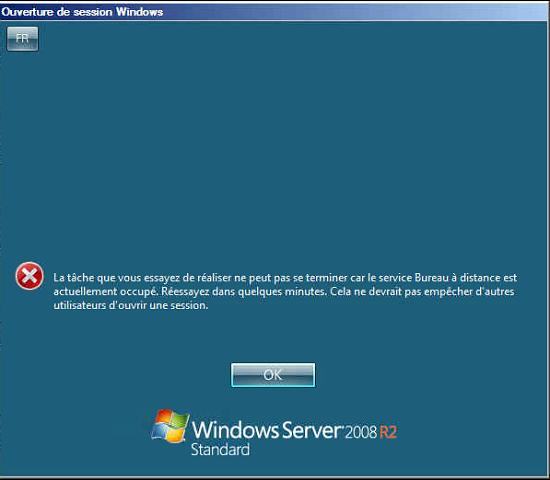
You will see some printscreen with the ica-rdp's description, but I'am using the Windows Server built-in tool to reset the session, and the RDP's session manager was in error too for that session. (ica is built over rdp)\
From that MMC you see an active session, but no application run.
When that happen you will have those symptoms:
- In taskmgr you will see no application under the useraccount in error
- In the RDP's MMC you will not see the user logged, even if you see everyone else logged.
- The user profile is lock. (IE, you can't delete it)
- The winlogon process seem to never finish for that session

From the MMC you can't kill the session or reset it as it does not offer the choice to do it.
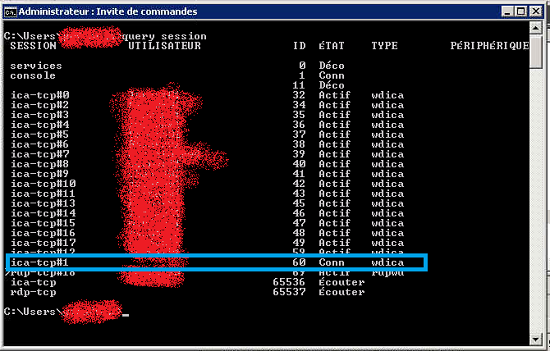
The first thing to do is a query session in command shell to validate. There we can see the real status, it's still in Connecting.
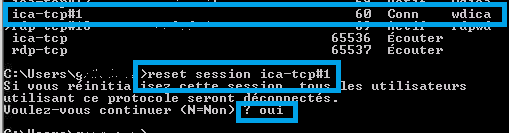
After you can issue a reset session \<session-name>.
Now relax and enjoy, you just saved yourselft a server restart for a hung connection :)
In my case the culprit was a bad GPO for that user.
Books
November 25, 2014, 9:11 pmThe Wiki Ninjas Guide to SharePoint 2013 - IDTP
I’m proud to present you the second Wiki Ninjas Guide to SharePoint 2013. This eBook is not mine. It's also not yours. But it’s from the community. You can find many articles here written by Philippe Levesque, Benoit Jester, Valentin Lecerf, Hezequias Vascelamos and Gokan Ozcifci!
This eBook is intended for people all around the world with the following questions: “Why should I come and contribute to the WIKI” or “Oh what kind of articles can I find on the WIKI”… In stand of selected articles on the WIKI I guess we can create a hug impact with a real eBook. Authors, guest authors and many contributors, you all can be proud about the amount of articles and your will to improve the Wiki!
Specials thanks to:
- Ed Price
- Bruno Lewin
- Philippe Levesque
- Benoit Jester
- Valentin Lecerf
- Hezequias Vascelamos
- ...
You all can download and/or share this eBook and begin evangelize the WIKI!
Happy SharePointing!