Active Directory Replication Tool
May 15, 2023, 2:33 pm
Hi
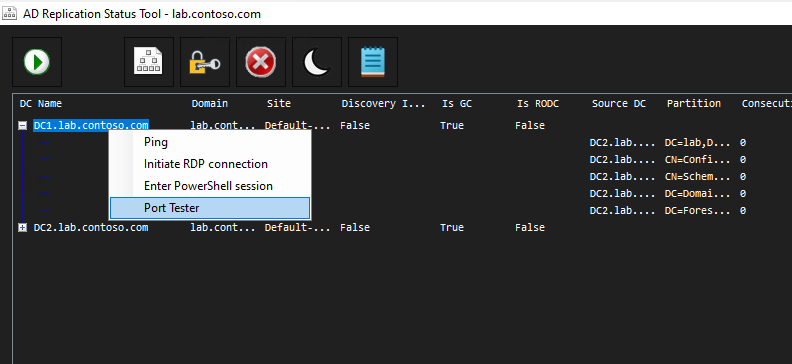
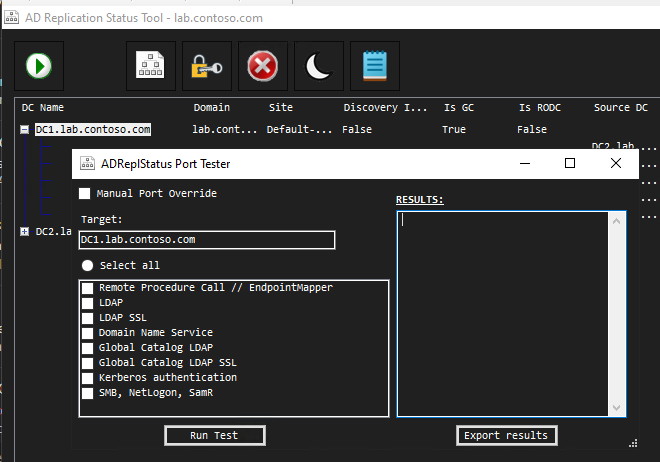
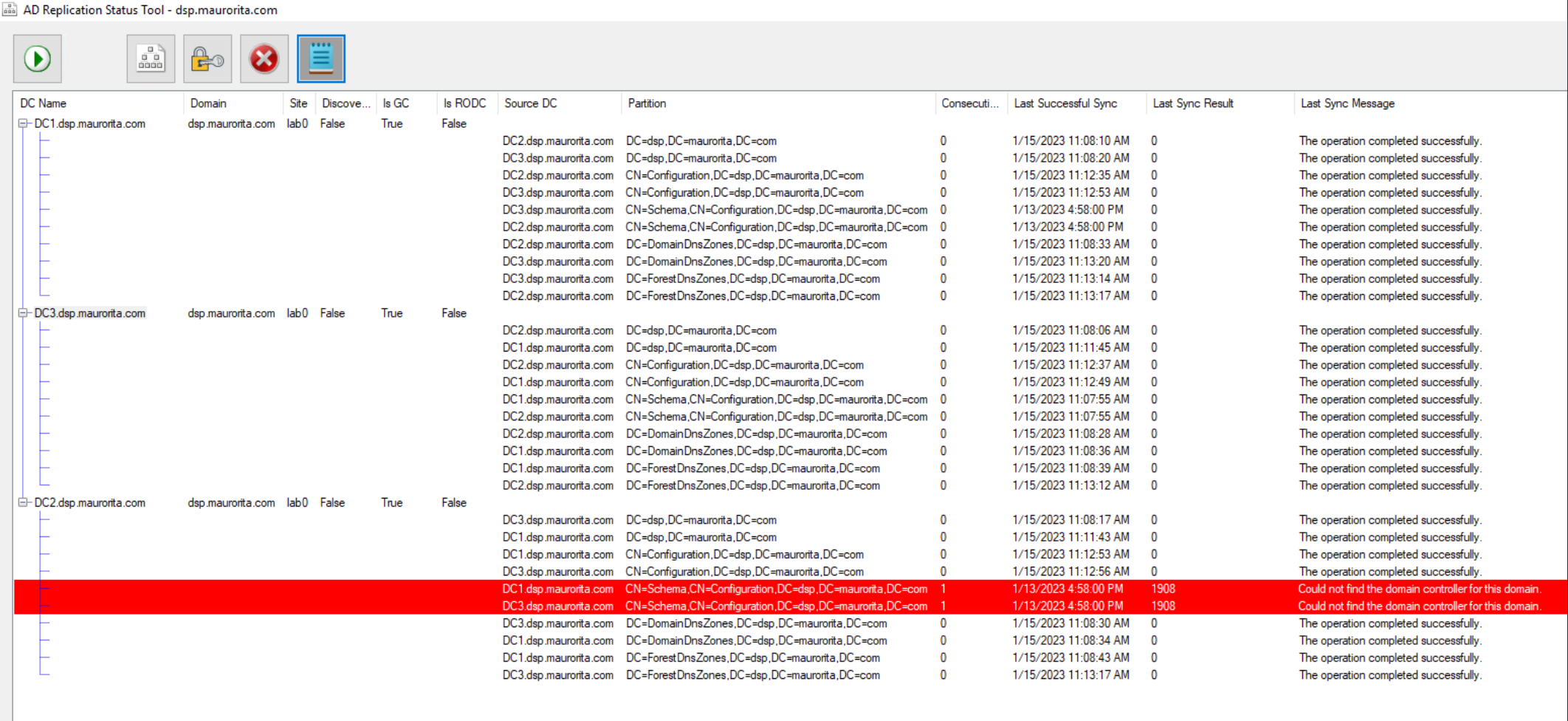
Today I wanted to share a nice project that was done by someone I know to test for AD Replication status.
The feature is really nice and it allow to diagnostic any replication error, or to see if it's working correctly.
To see how it look; (images took from the github reposterie)
To quote github, the reason behind the tool are;
- The old version of the tool had a time bomb in it - an expiring SSL certificate - that rendered the app unusable sometime around September 2022. Only through great effort internally were we able to periodically renew this certificate and republish the app, and the app was architected in such a way that excising the signing certificate check was more work than just rewriting the whole thing. (I know about the Sirona DLL hack, but still.)
- The old tool had no active maintainers and no one who was still around was familiar with the app's internals or source code.
- The old tool was showing its age... I mean, that Office-style ribbon was straight out of the Windows Vista era, was it not? Plus it contained a bunch of outdated TechNet links. You might argue that WinForms is similarly old-fashioned, but I just so happen to think WinForms is and always was PEAK Windows UI.
- Now we can maintain and improve this tool together. The Active Directory community.
If you want to get it, see the GitHub link there : ADReplStatus - https://github.com/ryanries/ADReplStatus
Whats news since Windows 2016 / 2019 / 2022
April 24, 2023, 12:11 pm
Hi
Today I wanted to share a link to a guide that show whats news between Windows Server OS.
The download link is here :)
Just in case the link go down, there is the content;


Edge Enterprise Site List
February 23, 2023, 4:44 pm
Hi everyone
With the end of Internet Explorer this month, if you update your computer, I wanted to talk a bit the enterprise site list manager of Microsoft.
It's a nice tool to create a list of site that need IE mode inside Edge.
Keep in mind that if you hardcode a shortcut, ie; "iexplorer.exe https://link_to_go" the redirection no longer work, as the update make Edge display the EOL of Internet Explorer and Edge open with tip for Enterprise mode, thus not catching the link that was trying to open.
For enterprise site list it's in basic a simple .XML file with entry inside it.
You can put the file inside a fileshare, locally into a desktop or on a website centrally.
The file format look like that;
That way it's empty;
<site-list version="1">
  <created-by>
    <tool>EMIESiteListManager</tool>
    <version>12.0.0.0</version>
    <date-created>02/06/2023 18:34:29</date-created>
  </created-by>
</site-list>
Inside the file we can add site now;
<site-list version="1">
  <created-by>
    <tool>EMIESiteListManager</tool>
    <version>12.0.0.0</version>
    <date-created>02/06/2023 18:34:29</date-created>
  </created-by>

<site url="127.0.0.1">
    <compat-mode>IE11</compat-mode>
    <open-in>IE11</open-in>
  </site>
</site-list>
If you manage multiple site you can note;
<site-list version="1">
  <created-by>
    <tool>EMIESiteListManager</tool>
    <version>12.0.0.0</version>
    <date-created>02/06/2023 18:34:29</date-created>
  </created-by>
<!-- Dev website  -->
<site url="127.0.0.1">
    <compat-mode>IE11</compat-mode>
    <open-in>IE11</open-in>
  </site>
</site-list>
If your website need special rule for authentication to work with cookie, some command like that can be used;
<site-list version="1">
  <created-by>
    <tool>EMIESiteListManager</tool>
    <version>12.0.0.0</version>
    <date-created>02/06/2023 18:34:29</date-created>
  </created-by>
<!-- Authentification  -->
<shared-cookie domain=".localhost" name="AUTH" source-engine="Both"/>
<!-- Dev website  -->
<site url="127.0.0.1">
    <compat-mode>IE11</compat-mode>
    <open-in>IE11</open-in>
  </site>
</site-list>
The magic here is after that, if you need help to write the file Microsoft did a tool for that purpose;
Enterprise Mode Site List Manager (schema v.2)

After the file is created and deployed, be sure to check in edge://compat to see if the list is ok :)
Debugging Edge Policies
February 13, 2023, 8:11 pm
Hi everyone
Today I wanted to share some small tips to debug Egde policies.
Not everyone know it, but you can list your GPO settings you push to the client !
It's a really nice add-on to Edge, as it allow to see if your targetting in your GPO work or not, and if the settings you push is the desired's one.
To display the windows you just have to enter in the browser bar; edge://policy
A windows like this one will appear;

Inside the windows you have the timestamps of the last time the policy was retrived.
If you need tod ebug IE Enterprise mode you can go to the edge://compat windows.
Like in that example we can see the .xml push by GPO was in error.

Next post I will talk how to debug the xml's file :) but with those tips atleast now we can spot where the error is if the policy dont work as intended.
Thanks everyone for the read !
Windows Dc Renaming Error
January 20, 2023, 4:18 pm
Hi everyone
Today I wanted to talk an issue I seen, it's not common, but it's an error that can happen. It's if you rename a DC like if it's a normal computer, not the correct way. The problem after is it break your Active Directory Database.
After the reboot you will see that error on the login screen of the DC;
Security database on the server does not have a computer account for this workstation trust relation on domain controller.
To recover you need to use netdom the old way.
Please know it's an issue with only one DC in a single forest. Don't do those step if you have other working DC or a bigger forest.
- First we do a backup in case something bad happen.
-
netdom computername \
-
netdom computername \
-
netdom computername \
- Restart
- Check all service if OK, after we remove the old name
-
netdom computername \
- Restart again.
That should do the trick to revert back to the good name, after that if you want to rename a DC, remember it's not a good idea, but at that point it's easier to promote another's one to do the trick. If you need to keep the old server up, you can make sure you have another DC, and after you demote and re-promote with the good name the DC you wanted to change the name.
Reference for the post