Microsoft Office 2013 32-bit over 64-bit error
October 22, 2016, 3:27 amToday I will blog about a small bug that happened to me on a Terminal Server, but the KB was really hard to find, the why I'm spotlighting it :)
This message is displayed with Outlook :

"Microsoft Office 64-bit Components 2013" with a progress bar stating "Please wait while Windows configure Microsoft Office 64-bit Components 2013"
...
"Error 2503: an internal error occured. Contact Microsoft support"
The KB2643974 is "Please wait while Windows Configures Microsoft Office 64-bit Components 2013" message when you start Outook 2013
The way to correct the bug :
To resolve this issue, install the Windows Search Service. To do this, following the steps that are appropriate for your version of Windows.
Windows 7 and Windows 8
Close Outlook.
Start Control Panel.
Click Programs and Features, and then click Turn Windows features on or off.
Enable Windows Search, and then click OK.
Restart the computer if you are prompted to do this.Windows Server 2012
Start Server Manager.
Click Manage, and then click Add Roles and Features.
On the Before You Begin page, click Next.
On the Installation Type page, select Role-based or Feature-based Installation, and then click Next.
On the Server Selection page, select the server or virtual hard disk on which you want to install the Windows Search Service.
On the Features page, select Windows Search Service, and then click Next.
On the Confirmation page, verify that Windows Search Service is listed, and then click Install.Windows Server 2008
Start Server Manager.
Click Roles in the left navigation pane.
Click Add Roles in the Roles Summary pane.
On the Server Roles page, select the File Services role, and then click Next.
On the Role Services page, select the Windows Search Service role service, and then click Next.
On the Confirmation page, verify that Windows Search Service is listed, and then click Install.If you prefer not to use or install the Windows Search Service, you can disable indexing in Outlook. To do this, follow these steps:
Exit Outlook.
Start Registry Editor. To do this, use one of the following procedures, as appropriate for your version of Windows.
Windows 8: Press Windows Key + R to open a Run dialog box. Type regedit.exe and then press OK.
Windows 7, Windows Server 2008, or Windows Server 2012: Click Start, type regedit.exe in the search box, and then press Enter.
In Registry Editor, locate and then click the following registry subkey:HKEY_LOCAL_MACHINE\SOFTWARE\Policies\Microsoft\Windows\Windows Search
Point to New on the Edit menu, and then click DWORD (32-bit) Value.
Type PreventIndexingOutlook, and then press Enter.
Right-click PreventIndexingOutlook, and then click Modify.
In the Value data box, type 1, and then click OK.
On the File menu, click Exit to exit Registry Editor.
Post related to that bug
Windows - How to easily deploy XenApp multiple farm config for a user
October 22, 2016, 2:54 amYou got a network with a remote desktop's farm, you use the citrix receiver with SSO to connect to another's farm and you need a third receiver configuration ?
It seem an overkill setup, but I seen it often as usually when like two enterprise merge, you can have the internal resource, and one another in another domain/forest.
I talk about simple stuff, the .ica, but be advised it's info hard to find in citrix, so kinda why I wrote it.
The limitation of the receiver can be hit pretty fast as :
- Only one farm/pn agent's site can be used at the same time.
- In the citrix web interface you can't add citrix server from another realm.
- Only one type of authentication used when the receiver is loaded.
In that scenario, you can imagine that if you need to connect to a third farm, you can hit the limitation pretty fast.
With those limitation in head, you can easily deploy a .ica file with GPP, and place the icon on the user desktop to open the connection.
A simple .ICA to connect to MS Word :
Word.ica
[Encoding]
InputEncoding = ISO8859_1
[WFClient]
Version=2
ProxyType=Auto
HttpBrowserAddress=X.X.X.X:80
ConnectionBar=0[ApplicationServers]
Word 2013=[Word 2013]
Address=X.X.X.X
InitialProgram=#Word 2013
CGPAddress=*:2598
ClientAudio=Off
DesiredColor=8
TWIMode = True
KeyboardTimer = 0
MouseTimer = 0
ConnectionBar=0
Username=
Domain=
TransportDriver=TCP/IP
WinStationDriver=ICA 3.0
BrowserProtocol=HTTPonTCP
Compress=On
EncryptionLevelSession=Encrypt
[Encrypt]
DriverNameWin32=PDCRYPTN.DLL
DriverNameWin16=PDCRYPTW.DLL
[Compress]
DriverName=PDCOMP.DLL
DriverNameWin16=PDCOMPW.DLL
DriverNameWin32=PDCOMPN.DLL
There is a ICA to connect to a bigger farm in balancing.
[Encoding]
InputEncoding = ISO8859_1
[WFClient]
Version=2
HttpBrowserAddress=X.X.X.X:80
HttpBrowserAddress2=X.X.X.X:80
ConnectionBar=0
CDMAllowed=Off[ApplicationServers]
Excel=[Excel]
Address=excel
InitialProgram=#Excel
ClientAudio=Off
DesiredColor=8
TWIMode = True
KeyboardTimer = 0
MouseTimer = 0
ConnectionBar=0
UseLocalUserAndPassword=Off
TransportDriver=TCP/IP
WinStationDriver=ICA 3.0
BrowserProtocol=HTTPonTCP
EncryptionLevelSession=Encrypt
[Encrypt]
DriverNameWin32=PDCRYPTN.DLL
DriverNameWin16=PDCRYPTW.DLL
You could add the line username, clearpassword and domain if you need to make it automatic and that you can't use SSO.
Username=
clearpassword=
Domain=
ps, you can use that tip to connect to a old metaframe/presentation server's farm with the newer receiver without the program neighborhood
Windows Server 2012 R2 KB3185279 & KB3185331 seem to break Google tip to block Youtube with DNS
October 21, 2016, 8:14 pmIn enterprise Google offered a tip to block youtube with the DNS;
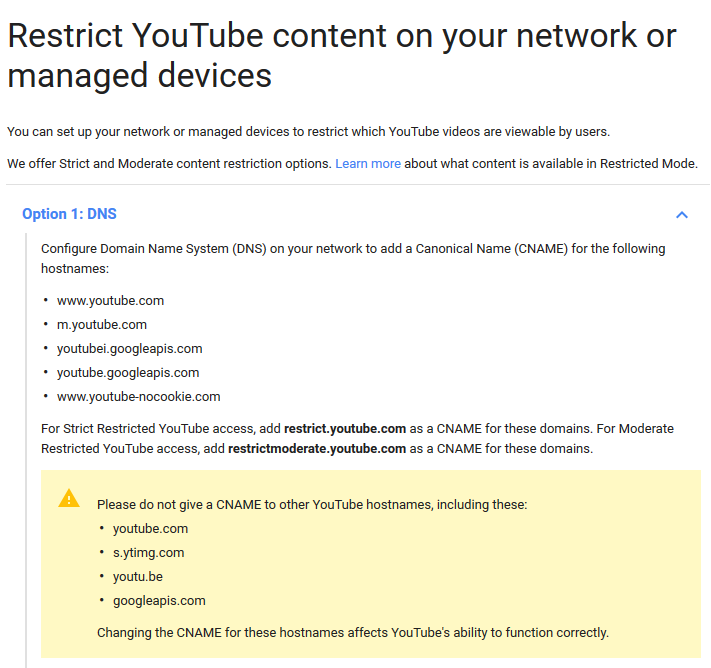
Some users posted that nslookup started not working after KB3185331
If we dig in the KB's text, we find that itselft that KB include nothing that can touch the DNS server, but digging farther show that;

The update 3185279 include that fix :
Addressed issue that causes Wildcard CNAME queries with Domain Name System Security Extensions (DNSSEC) enabled to not return Next Secure (NSEC) records.
Be sure to test out correctly if you need to make such tip after the update, as you may need to create a *.youtube.com's zone to bypass the problem (or remove the update)
Microsoft Offer some Virtual Machine for testing purpose
October 21, 2016, 7:37 pmI wanted to share that Microsoft share some VM for testing purpose, it's something I didnt seen much link too, and was surprised to see, thus why I share it there.
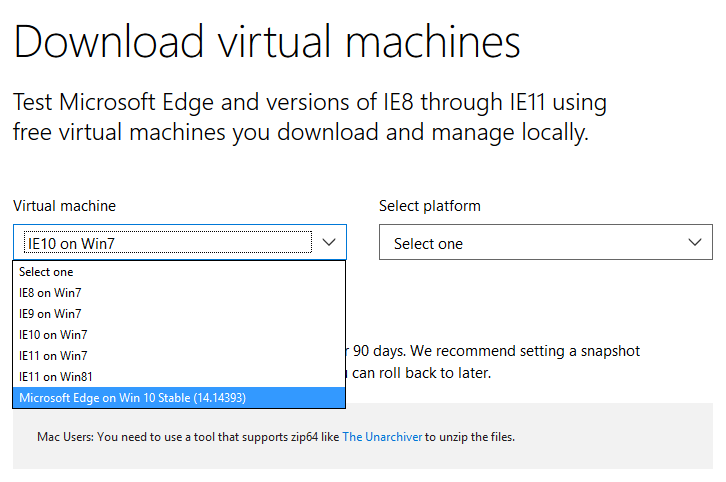
The site tag them for testing IE, but they are not stripped down, thus it's a good platform to test on.
In Windows Server 2012 R2, and error copying file name too long ?
October 21, 2016, 7:09 pmFile name too long to be copied ? still in 2016 with Windows Server 2012R2 ?
Yes, it can still happen !
Be sure Windows Update work good !, as it got patched in : Windows Server 2012 R2 Update (KB2919355)
The KB include that specific KB : 2891362 - A file copy operation fails when files or folders have long paths in Windows Explorer
Symptoms
Consider the following scenario:You have a computer that is running Windows 8.1, Windows Server 2012 R2, Windows 8, Windows Server 2012, Windows 7 Service Pack 1 (SP1), or Windows Server 2008 R2 Service Pack 1 (SP1).
You use Windows Explorer to try to copy files or folders in order to paste them into some other folder.
The files or folders that you copy have paths that exceed the maximum allowable path length.
In this scenario, the behavior of the copy operation is unreliable and fails because of the length of the file or folder path. Additionally, you may experience one of the following symptoms:The copy operation fails and generates a message that states that the path (file name) is too long. The message also suggests that you shorten the file name and try to copy again.
The copy operation does not start. In this case, no message is generated.
The copy operation starts, copies a few files or folders, and then fails without generating a message.
This problem may prevent some files or folders from being copied. You may not realize the the problem occurred if you do not receive an error message. Different symptoms may occur, depending on how the files are selected for copying.Note This problem can also occur when you try to copy files or folders from Volume Shadow Copy Service snapshots if the file or folder length in the snapshot exceeds the maximum path length.
Apply the KB to fix the problem for good ! and if you can't, shorten the path to make the copy.